
Blog
Business Process Automation Examples to Transform Your Business in 2025
Want to boost your business's efficiency and free up valuable time? This listicle showcases eight key business process automation examples relevant for 2025. Discover...
Unlocking Efficiency: Automation Examples for 2025
Want to boost your business's efficiency and free up valuable time? This listicle showcases eight key business process automation examples relevant for 2025. Discover how automating processes, from customer service to supply chain management, can streamline operations, cut costs, and improve productivity. Explore practical applications of Robotic Process Automation (RPA), Intelligent Document Processing (IDP), and other automation solutions to gain a competitive edge. This list provides tangible business process automation examples you can implement today.
1. Robotic Process Automation (RPA)
Robotic Process Automation (RPA) is a powerful business process automation example that leverages software robots, or "bots," to automate repetitive, rule-based tasks. Imagine having a digital workforce that tirelessly handles mundane tasks, freeing up your human employees to focus on more strategic and engaging work. These bots interact with existing software applications just like a human would – clicking, typing, and navigating between screens. This makes RPA an ideal solution for automating processes without needing to overhaul your existing systems, a key benefit for businesses looking for quick wins in efficiency. This approach allows companies to significantly improve operational efficiency and reduce costs without requiring extensive IT resources for system integration.

RPA is particularly effective for tasks involving structured data and clearly defined rules. Think data entry, invoice processing, report generation, and even some customer service interactions. Its features include software robots designed to mimic human-computer interactions, no-code or low-code implementation options for accessibility, and the ability to work with existing systems without complex API integration. This latter point is crucial, as it means RPA can be implemented quickly and with minimal disruption to ongoing operations. This allows for faster implementation compared to traditional automation solutions, which often require significant system modifications and lengthy development cycles.
Why RPA Deserves its Place in the List:
RPA's rapid implementation, non-invasive nature, and significant return on investment (ROI) make it a stand-out choice for business process automation. Companies often see a 40-70% reduction in manual processing time, and error rates plummet thanks to the precision of bots. The ability to operate 24/7 further amplifies productivity gains, allowing for continuous processing and faster turnaround times. The typically quick ROI, often within 6-9 months, makes it a particularly attractive option for businesses seeking fast, tangible results.
Pros:
- Quick Implementation: Minimal IT involvement translates to faster deployment.
- Non-Invasive: Works with your existing systems, avoiding disruption.
- Reduced Manual Processing Time: Significant time savings (40-70% typical).
- Reduced Error Rates: Bots offer near-perfect accuracy for well-defined tasks.
- 24/7 Operation: Continuous processing for enhanced productivity.
- Quick ROI: Often within 6-9 months.
Cons:
- UI Changes: Bots can be affected by changes to the user interface of target applications.
- Limited to Rule-Based Processes: Struggles with complex decision-making.
- Maintenance: Requires ongoing maintenance and updates, especially for complex processes.
- Exception Handling: Robust exception handling is crucial for smooth operation.
Examples of Successful RPA Implementation:
- Ernst & Young streamlined tax form processing with RPA, achieving a 50% reduction in processing time.
- American Express uses RPA for credit card application processing, improving accuracy to near 100%.
- Walmart deployed RPA for invoice processing, handling over 500,000 invoices per month.
- Deutsche Bank automated 30% of its processes with RPA, saving thousands of hours of manual work.
Tips for Implementing RPA:
- Start Small: Begin with simple, high-volume, rule-based processes.
- Document Thoroughly: Detailed process documentation is key to successful bot development.
- Governance is Key: Establish a robust governance structure to manage your RPA program.
- Center of Excellence: Consider an RPA Center of Excellence for larger-scale implementations.
- Plan for Maintenance: Allocate resources for ongoing bot maintenance and updates.
Popularized By:
- UiPath
- Automation Anywhere
- Blue Prism
- Microsoft Power Automate
RPA offers a compelling approach to business process automation, offering tangible benefits for organizations across various industries. By understanding its strengths and limitations, and by following the implementation tips provided, you can leverage the power of RPA to streamline your operations and achieve significant efficiency gains.
2. Intelligent Document Processing (IDP)
Drowning in paperwork? Spending countless hours manually entering data from documents? Intelligent Document Processing (IDP) offers a lifeline for businesses bogged down by document-heavy processes. As a prime example of business process automation, IDP leverages the power of Optical Character Recognition (OCR), Artificial Intelligence (AI), and machine learning to transform how organizations handle their documents. This technology extracts, classifies, and processes data from various document formats, both structured and unstructured, converting them into usable data that integrates seamlessly into existing business systems. This makes IDP particularly valuable for organizations dealing with high volumes of paperwork, from invoices and contracts to medical claims and customer onboarding forms.
Imagine a world where instead of manually reviewing and entering data from thousands of invoices, your system automatically extracts all the necessary information, validates it, and inputs it directly into your accounting software. That's the promise of IDP. It works by first scanning documents using OCR to convert text and images into machine-readable data. Then, AI and machine learning algorithms take over, classifying document types, extracting relevant information based on pre-defined rules or learned patterns, and even understanding the context of the information thanks to Natural Language Processing (NLP). This eliminates tedious manual data entry and significantly accelerates document processing times.
The benefits are compelling. IDP can reduce manual data entry by a staggering 80-90%, simultaneously improving data accuracy to 90-99%. This increased accuracy minimizes costly errors and improves the overall quality of data used in decision-making. Moreover, IDP can accelerate document processing speed by 30-80%, freeing up valuable employee time for more strategic tasks. The technology scales easily to handle fluctuating document volumes, making it adaptable to changing business needs. And thanks to machine learning, the system continuously learns and improves its accuracy over time.
Real-world examples demonstrate IDP's transformative potential. JPMorgan Chase implemented IDP to process over 12,000 commercial loan agreements annually, reducing processing time from hours to mere minutes. Anthem Health uses IDP to process medical claims, achieving a 70% reduction in processing time. Even IKEA has embraced IDP for invoice processing across 29 countries, handling a staggering 4 million invoices annually. AXA Insurance utilizes IDP for claims processing, reducing manual work by 80%. These examples highlight how diverse industries are leveraging IDP for business process automation.
While the benefits are significant, it's crucial to be aware of the potential challenges. Initial setup requires a training period for the AI components, and complex documents may still require human verification. Maintaining high accuracy demands ongoing model maintenance, and performance can vary based on document quality. Enterprise-wide implementation might also require a significant investment.
Tips for Successful IDP Implementation:
- Start Small: Begin with high-volume, standardized document types to see quick wins and refine your approach.
- Data is King: Ensure adequate, high-quality training data for your machine learning models.
- Validation is Key: Implement validation workflows for exceptions and handle cases that require human intervention.
- Measure and Monitor: Establish clear accuracy metrics and continually monitor performance to identify areas for improvement.
- Integrate for Efficiency: Integrate IDP with downstream systems for seamless end-to-end automation.
- Consider the Cloud: Cloud-based IDP solutions often offer easier scalability and faster deployment.
Popular IDP Solution Providers:
- ABBYY
- Kofax
- IBM Watson
- Amazon Textract
- Docsumo
For Customer Support Managers struggling with support tickets, Hospitality Professionals managing reservation documents, Real Estate Agents processing contracts, Healthcare Providers dealing with patient records, Enterprise IT Managers overseeing system logs, business owners handling invoices, CEOs reviewing reports, and CTOs seeking efficiency gains, IDP presents a compelling solution for automating document-centric processes and unlocking significant business value. Its ability to streamline workflows, improve accuracy, and free up valuable employee time makes it a powerful tool for any organization looking to optimize operations and gain a competitive edge. This is why IDP undoubtedly deserves its place on this list of business process automation examples.
3. Workflow Automation Platforms
Workflow automation platforms empower businesses to streamline operations by automating complex, multi-step processes. These platforms provide the tools to design, execute, and manage entire workflows, orchestrating tasks, approvals, and data flows across various systems and participants. Think of them as the conductors of your business orchestra, ensuring all sections play in harmony and achieve a beautiful symphony of efficiency. This orchestration is achieved through features like visual process builders, form designers, and powerful integration capabilities, allowing businesses to automate even intricate processes without needing extensive coding knowledge. This creates streamlined operations and improved visibility, freeing up valuable time and resources.
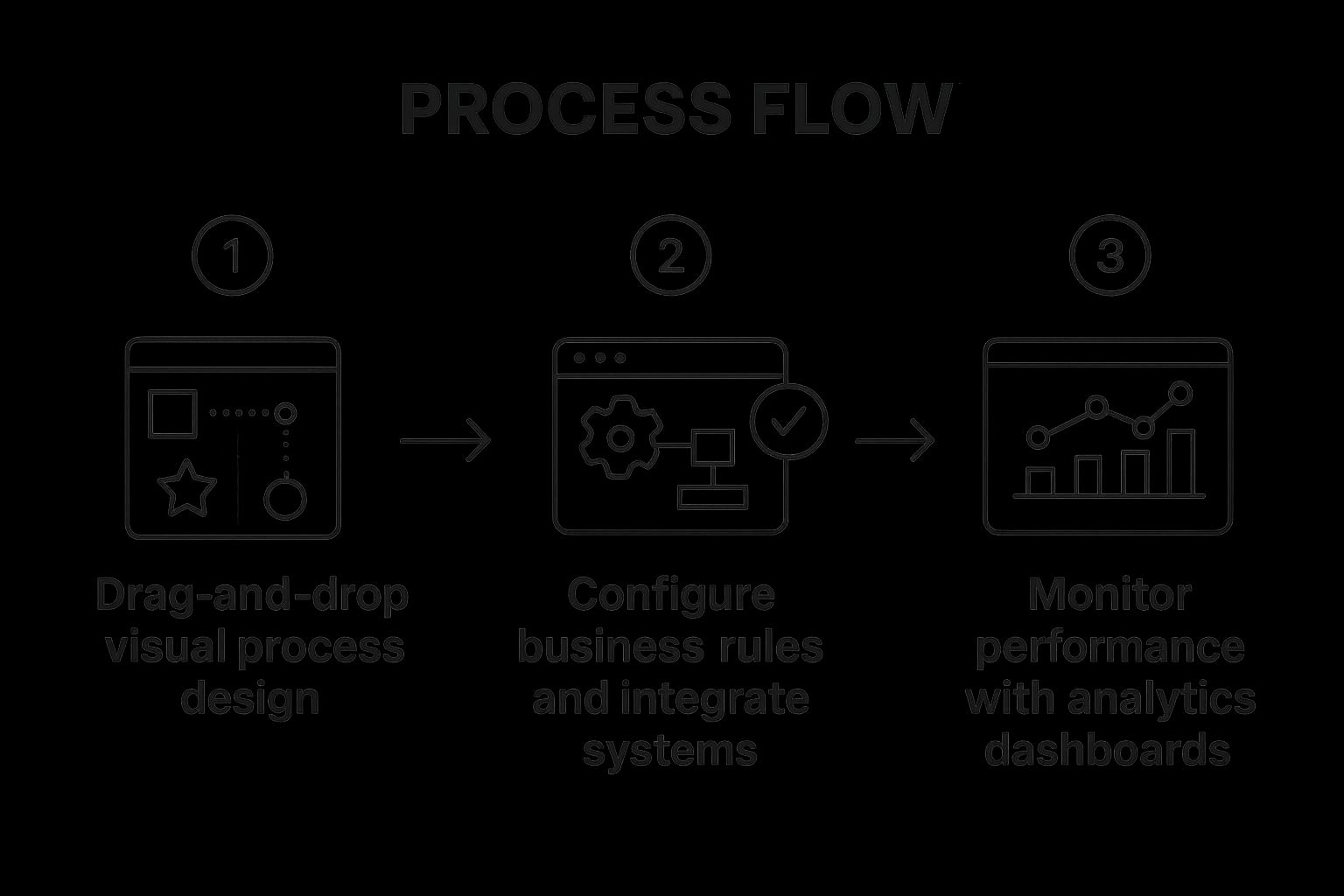
The infographic above visualizes a typical workflow automation process, starting from process identification and mapping, moving through automation design and implementation, and culminating in monitoring and optimization. It highlights the cyclical nature of workflow automation, emphasizing the importance of continuous improvement. The key takeaway is that workflow automation is not a one-time project but an ongoing process of refinement and adaptation to changing business needs.
Workflow automation platforms offer a range of features designed for optimal process management: visual process designers with drag-and-drop interfaces for easy workflow creation; form builders for efficient data collection; conditional logic and business rules engines to automate decision-making; integration capabilities to connect with existing systems; role-based access controls for security; process analytics and monitoring for performance tracking; and mobile accessibility for on-the-go management. These features combine to provide a comprehensive solution for end-to-end process automation.
These platforms are particularly valuable for businesses looking to streamline complex, multi-departmental processes such as customer onboarding, IT service management, or supply chain management. For example, imagine a customer support ticket needing approval from multiple departments. A workflow automation platform can automatically route the ticket to the appropriate individuals, track its progress, and ensure timely resolution.
Pros:
- Enables end-to-end process automation across departments
- Reduces approval times by 50-80%
- Provides process visibility and tracking
- Improves compliance with automatic documentation
- Adaptable to changing business requirements
- Can be implemented incrementally by process
Cons:
- May require significant process redesign for optimal results
- Complex integrations can increase implementation time
- User adoption challenges when replacing established processes
- May require ongoing configuration as business needs change
- Can be expensive for enterprise-wide deployment
Real-World Success Stories:
- Salesforce leveraged ServiceNow to automate IT service management workflows, reducing ticket resolution time by a remarkable 60%.
- Mayo Clinic implemented Pega for patient journey management, processing over 20 million transactions monthly.
- Siemens automated procurement processes with Appian, achieving a 60% reduction in cycle time.
- Chevron deployed IBM Business Automation Workflow for capital project approvals, saving an impressive $30 million annually.
Tips for Successful Implementation:
- Map and optimize processes before automation.
- Involve end users in the design process to improve adoption.
- Implement in phases, starting with high-impact processes.
- Build for change with flexible process designs.
- Establish clear KPIs to measure success.
- Create a center of excellence for governance.
- Use process mining to identify automation opportunities.
When and Why to Use Workflow Automation Platforms:
Workflow automation platforms are ideal when dealing with repetitive, multi-step processes that involve multiple people or systems. They are particularly beneficial when seeking to reduce errors, improve efficiency, increase transparency, and enhance compliance. For customer support managers, hospitality professionals, real estate agents, healthcare providers, enterprise IT managers, business owners, CEOs, and CTOs alike, workflow automation platforms offer a potent tool for optimizing operations and driving bottom-line results.
Learn more about Workflow Automation Platforms
Workflow automation platforms, popularized by leading vendors like ServiceNow, Pega, Appian, Kissflow, Monday.com, and IBM Business Automation Workflow, deserve a prominent place in any discussion of business process automation examples because they offer a comprehensive and powerful approach to streamlining operations and achieving significant efficiency gains.
4. Customer Service Automation
In today's fast-paced digital world, customers expect instant gratification. They want their questions answered and their issues resolved quickly and efficiently, regardless of the time of day. Meeting these rising expectations while managing costs can be a significant challenge for businesses. This is where customer service automation comes in as a prime example of effective business process automation. It leverages the power of artificial intelligence (AI) to streamline and enhance customer interactions, resulting in improved customer satisfaction and operational efficiency. Customer service automation uses AI-powered tools like chatbots, virtual assistants, and self-service portals to handle a wide range of customer inquiries, support requests, and even common transactions, often without any human intervention.

These intelligent systems can respond instantly to customer needs 24/7, ensuring continuous support availability. For more complex issues that require a human touch, these systems seamlessly route the interaction to a live agent, ensuring that customers receive the appropriate level of assistance. Moreover, these AI-powered solutions continuously learn from each interaction, improving the accuracy of their responses and enhancing customer satisfaction over time. This makes customer service automation a valuable tool for businesses of all sizes, from small startups to large enterprises. Learn more about Customer Service Automation
This approach offers several key features including AI-powered chatbots capable of engaging in natural, conversational support; Natural Language Processing (NLP) for accurately understanding customer intent; integration with knowledge bases to ensure consistent and accurate answers; multi-channel support across web, mobile, and social media platforms; automated ticket routing and prioritization; self-service portals for handling common requests; and sentiment analysis for detecting customer emotions and tailoring responses accordingly.
The Benefits and Drawbacks:
Customer service automation offers compelling advantages, such as 24/7 availability, handling 40-80% of routine inquiries without human intervention, reducing response times dramatically, ensuring a consistent customer experience across all channels, providing scalability during peak demand periods, freeing up human agents to focus on complex and high-value interactions, and significantly reducing support costs by 15-70% depending on the implementation. However, it also has potential drawbacks. Poorly designed systems can frustrate customers, requiring careful planning and execution. Regular content updates and maintenance are essential to ensure accuracy and relevance. While automation handles many routine inquiries, complex issues still require human intervention. The initial setup involves significant knowledge base development, and supporting multiple languages adds to the implementation complexity.
Real-World Success Stories:
Several companies have demonstrated the power of customer service automation: Mastercard’s AI assistant handles 75% of customer inquiries automatically; H&M's virtual assistant processes over 1 million customer conversations monthly; Airbnb's automated resolution system handles 60% of customer issues without human intervention; and Bank of America's Erica virtual assistant has served over 19.5 million customers and handled billions of interactions. These examples highlight how customer service automation can transform customer support operations and drive significant business value.
Actionable Tips for Implementation:
For businesses looking to implement customer service automation, it's crucial to focus on solving the most common customer issues first. Design conversation flows with a focus on positive customer experience. Create clear escalation paths to human agents for complex issues. Regularly analyze conversation logs to identify areas for improvement and refine responses. Start with a limited scope and expand as you gain experience and learn from your data. Continuously test with real users before full deployment to identify potential issues and optimize performance. Finally, measure both efficiency metrics (like response time and resolution rate) and customer satisfaction to ensure a balanced approach.
Why Customer Service Automation Deserves its Place:
Customer service automation is a critical component of modern business process automation because it directly addresses the increasing customer demand for instant, efficient, and personalized support. By automating routine tasks, businesses can improve customer satisfaction, reduce operational costs, and free up human agents to focus on more complex and strategic interactions. In a world where customer experience is a key differentiator, customer service automation is no longer a luxury, but a necessity for businesses looking to thrive. Platforms like Zendesk, Intercom, IBM Watson Assistant, Freshdesk, Drift, and Ada are popularizing and empowering businesses to implement effective customer service automation strategies.
5. Email Processing Automation
Drowning in a sea of emails? For busy professionals like customer support managers, hospitality professionals, real estate agents, healthcare providers, and IT managers, not to mention business owners and CEOs, efficient email management is crucial. Email processing automation offers a lifeline, streamlining communication and freeing up valuable time. This form of business process automation uses rule-based systems and artificial intelligence (AI) to automate the tedious tasks associated with handling large volumes of email, making it a prime example of how automation can drastically improve business processes. Learn more about Email Processing Automation
Imagine a system that automatically sorts your incoming emails, routes them to the correct department, extracts key information, and even drafts replies. That's precisely what email processing automation delivers. It works by analyzing incoming emails based on pre-defined rules and AI-powered algorithms. These systems can identify the sender, subject, keywords, and even the sentiment expressed in the email to determine the appropriate action.
This automation goes beyond simple filtering. Features like automatic email classification and routing ensure that emails reach the right person quickly. Data extraction from email content and attachments pulls out important details, eliminating manual data entry. Template-based auto-responses handle common inquiries, providing instant acknowledgment and information. Integration with CRM and ticketing systems connects email communication with existing workflows, while priority scoring based on content analysis ensures urgent matters are addressed promptly. Even sentiment analysis can be employed for customer communications, gauging customer satisfaction and flagging potentially negative feedback. The system can leverage either rule-based processing, AI, or a combination of both for maximum flexibility and effectiveness.
The benefits are significant. Studies show email processing automation can reduce email processing time by a staggering 60-90%, ensuring consistent handling of similar requests and eliminating that dreaded email backlog during peak periods. Response times improve dramatically, often from hours to mere minutes. This allows staff to focus on complex communications requiring a human touch, while reducing errors in email classification and routing. Automated systems also create detailed audit trails, invaluable for compliance purposes.
For example, Lufthansa implemented email automation for customer service, handling over 100,000 emails monthly with 80% automated processing. HSBC automated compliance email processing, reducing handling time from 7 minutes to just 30 seconds per email. Expedia Group automated travel confirmation emails, saving thousands of agent hours every month. Even Sony Electronics uses email automation for order processing, reducing errors by an impressive 90%. These examples clearly demonstrate the power of email processing automation in diverse industries.
While the advantages are compelling, some drawbacks exist. Systems may misclassify novel or unusual requests, and implementation can be complex for organizations with diverse email needs. Regular rule updates and maintenance are necessary, and AI systems require an initial training period. Security concerns related to sensitive email content must also be addressed.
To successfully implement email processing automation, consider these tips: analyze email patterns before designing automation rules; start with high-volume, standardized email types; create clear guidelines for when human intervention is required; regularly review auto-response quality and accuracy; and don't forget about privacy regulations. Implementing feedback loops to improve classification accuracy and using A/B testing to optimize auto-response effectiveness are also crucial for long-term success.
Platforms like EmailTree AI, Levity, Salesforce Einstein, Microsoft Power Automate, and Zapier provide robust email automation solutions to get you started.
In conclusion, email processing automation is a powerful tool for businesses of all sizes. By automating repetitive email tasks, organizations can significantly improve efficiency, reduce costs, and enhance customer satisfaction. This makes it a worthy addition to any list of business process automation examples, especially for those looking to optimize communication workflows and free up valuable time.
6. Financial Process Automation
Financial process automation is a game-changer for businesses of all sizes, earning its place on this list as a prime example of business process automation's power. It streamlines core financial operations by digitizing and automating tasks traditionally handled manually. This includes everything from accounts payable and receivable, to expense management, financial reporting, and the often dreaded month-end close. Instead of shuffling paper invoices and manually entering data, specialized software and integrations take over, processing invoices, approving payments, reconciling accounts, and generating reports with remarkable speed and accuracy. This offers a significant advantage in today's fast-paced business environment, allowing finance teams to shift their focus from tedious tasks to strategic financial analysis.
How it Works:
Financial process automation software uses technologies like optical character recognition (OCR) to capture data from invoices and other financial documents. This data is then automatically entered into the system, triggering automated workflows for approval routing, payment processing, and reconciliation. Rules-based logic can be implemented to ensure compliance with internal policies and external regulations. Real-time dashboards and reporting provide instant visibility into financial performance, enabling proactive decision-making.
Examples of Successful Implementation:
Several major corporations have embraced financial process automation with impressive results:
- Siemens: Automated accounts payable globally, processing a staggering 8 million invoices annually with 85% touchless processing.
- Coca-Cola: Automated its financial close process, dramatically reducing close time from 10 days to a mere 3 days.
- Unilever: Implemented BlackLine for reconciliations, achieving 99.5% accuracy with 40% less effort.
- American Express: Automated expense management, processing 2 million reports annually with a 94% automation rate.
These examples showcase the transformative potential of financial process automation across various industries.
Features and Benefits:
Financial process automation solutions typically offer a suite of features, including:
- Automated invoice capture and processing
- Digital approval workflows for expenditures
- Automated payment execution and reconciliation
- Expense report automation and validation
- Automated financial close processes
- Real-time financial dashboards and reporting
- Compliance checks and audit trails
- Integration with banking and ERP systems
The benefits are equally compelling:
Pros:
- Reduces invoice processing costs by 60-80%
- Shortens month-end close cycles by 50-70%
- Captures early payment discounts (typically 1-2% savings)
- Improves cash flow forecasting accuracy
- Reduces financial errors and fraud risk
- Enhances compliance with financial regulations
- Provides real-time visibility into financial status
Cons:
- Requires significant process standardization
- Initial setup costs can be substantial
- Integration with legacy financial systems can be challenging
- Requires change management for finance team adoption
- May need customization for industry-specific requirements
When and Why to Use This Approach:
Financial process automation is particularly beneficial for organizations experiencing rapid growth, high transaction volumes, or struggling with manual processes and errors. It's a valuable tool for customer support managers dealing with billing inquiries, hospitality professionals managing expenses, real estate agents tracking transactions, healthcare providers processing claims, enterprise IT managers overseeing budgets, and business owners/CXOs looking to improve financial efficiency.
Actionable Tips for Implementation:
- Standardize: Start with standardizing financial processes before automation.
- Prioritize: Focus on high-volume transactions first (like AP/AR).
- Control: Implement strong controls and segregation of duties.
- Exceptions: Create clear exception handling procedures.
- Training: Train finance staff on new tools and processes.
- Audit: Regularly audit automated processes for accuracy.
- Compliance: Consider regulatory requirements in automation design.
Popular Platforms:
- BlackLine: Financial close automation platform
- Coupa: Business spend management platform
- SAP Concur: Expense management automation
- Oracle NetSuite: Cloud financial automation
- Sage Intacct: Financial management platform
- Tipalti: Accounts payable automation
By embracing financial process automation, organizations can free up valuable time and resources, improve accuracy and compliance, and gain deeper insights into their financial performance, ultimately driving better business outcomes.
7. HR Process Automation
HR Process Automation is a game-changer for businesses of all sizes, revolutionizing how human resources departments operate. It's a prime example of business process automation, digitizing and streamlining workflows from recruitment and onboarding to performance management, benefits administration, and even offboarding. This automation improves the employee experience and frees up HR teams from tedious administrative tasks, allowing them to focus on strategic initiatives. This is why it deserves a prominent place on any list of business process automation examples.
Imagine a world where HR professionals aren't buried under mountains of paperwork or bogged down by repetitive data entry. That's the power of HR Process Automation. It works by implementing software and systems that automate key HR functions. For example, applicant tracking systems can automatically screen resumes, schedule interviews, and send out rejection letters. Onboarding systems can digitize paperwork, deliver training modules, and manage employee benefits enrollment.
This automation isn't just about making things easier; it's about tangible results. Automated job postings and candidate screening can reduce hiring cycle time by 30-50%. Digital onboarding workflows can slash onboarding process time by 50-70%. These efficiencies can lower HR administrative costs by 20-30% and significantly improve employee experience and satisfaction. Furthermore, automated systems ensure consistent compliance with labor regulations, providing data-driven insights for workforce planning and reducing errors in payroll and benefits administration.
Real-world success stories abound. IBM automated its onboarding process, handling over 45,000 new hires annually with a remarkable 90% reduction in paperwork. L'Oréal implemented automated recruitment screening, which reduced time-to-hire by 40%. Adobe automated performance management, saving more than 100,000 hours of manager time annually. And PepsiCo deployed ServiceNow HR for employee self-service, automating the handling of 70% of HR inquiries. As LeaveWizard points out in their article on automating HR processes, streamlining these core HR functions is crucial for boosting business success.
While the benefits are clear, it's important to be aware of potential drawbacks. Implementing HR Process Automation can feel impersonal if not balanced with human touchpoints, especially for sensitive matters like performance reviews or disciplinary actions. The implementation process itself can be complex, requiring careful planning and change management across multiple HR functions. Integrating new systems with legacy HRIS can also present challenges. Finally, regular updates are necessary to maintain compliance with ever-changing regulations.
Here are some actionable tips for successful HR Process Automation:
- Prioritize automation based on employee impact and HR time savings. Start with the most time-consuming and impactful processes.
- Design for mobile accessibility to maximize adoption. Employees expect access to HR information and services on the go.
- Maintain human interaction for sensitive HR matters. Automation should support, not replace, human connection.
- Ensure compliance features adapt to multiple jurisdictions. This is particularly important for businesses operating in multiple states or countries.
- Create feedback loops to continuously improve processes. Gather feedback from both employees and HR staff to identify areas for improvement.
- Focus on user experience for both employees and HR staff. The system should be intuitive and easy to use for everyone involved.
- Consider data privacy implications of HR automation. Ensure compliance with data privacy regulations and best practices.
Popular platforms for HR Process Automation include Workday's HCM cloud platform, ServiceNow HR's digital workflow platform, BambooHR for small/medium businesses, Oracle HCM Cloud, Rippling's employee management platform, and SAP SuccessFactors HXM suite.
Whether you're a Customer Support Manager looking to streamline onboarding, a Hospitality Professional managing a large workforce, a Real Estate Agent juggling multiple transactions, a Healthcare Provider navigating complex regulations, an Enterprise IT Manager overseeing system integrations, a business owner seeking to improve efficiency, a CEO focused on strategic growth, or a CTO exploring innovative technologies, HR Process Automation offers significant advantages for optimizing your human resources operations and driving business success.
8. Supply Chain and Inventory Automation
In today's fast-paced business world, efficient supply chain management is crucial for success. Supply chain and inventory automation represents a powerful business process automation example, leveraging technology to streamline operations and boost profitability. This approach uses a combination of IoT sensors, artificial intelligence (AI), and integrated systems to automate key processes like inventory management, demand forecasting, order processing, and logistics coordination. Imagine a system that automatically tracks inventory levels in real-time, predicts future demand, optimizes ordering quantities, and seamlessly coordinates with suppliers and shipping partners – all with minimal manual intervention. This is the power of supply chain and inventory automation.

This automation offers a wealth of features including automated inventory tracking and replenishment, AI-powered demand forecasting, automated purchase order generation, real-time inventory visibility across multiple locations, supplier collaboration portals, warehouse automation integration, transportation management automation, and robust supply chain analytics for continuous optimization. For businesses dealing with complex logistics, this translates into significant advantages. Think reduced inventory carrying costs, fewer stockouts, lower procurement processing costs, more accurate forecasts, faster order fulfillment, and the ability to implement just-in-time inventory management. All of this contributes to a more resilient and responsive supply chain, better equipped to handle disruptions. Learn more about Supply Chain and Inventory Automation
Companies like Amazon, Walmart, Procter & Gamble, and Toyota have successfully implemented supply chain automation, demonstrating its transformative potential. Amazon, for example, manages millions of SKUs with remarkable accuracy thanks to its automated inventory management system. Walmart has significantly reduced out-of-stocks through automated replenishment, and Procter & Gamble leverages automation to manage hundreds of brands across numerous countries. Toyota's renowned just-in-time system, a prime example of supply chain automation, has saved the company billions in inventory costs.
While the benefits are compelling, it's important to be aware of the potential challenges. Implementing supply chain and inventory automation requires significant integration across multiple systems, which can lead to substantial initial setup costs. The system's effectiveness also relies heavily on the quality of data received from various sources. Furthermore, implementation can be complex, especially for global supply chains, and often requires supplier adoption for maximum benefit.
For those considering this type of automation, a phased approach is recommended. Start by focusing on achieving inventory visibility before moving on to more advanced automation features. Prioritize high-value, high-turnover items initially and ensure your master data is clean and accurate before implementation. Collaboration is key; involve key suppliers in the planning process. Finally, establish exception management processes to handle unexpected disruptions and leverage machine learning for continuous improvement.
This approach to business process automation is particularly valuable for customer support managers, hospitality professionals, real estate agents, healthcare providers, enterprise IT managers, business owners, CEOs, and CTOs. Anyone responsible for managing resources, optimizing operations, and ensuring a smooth flow of goods or services can benefit from the increased efficiency, cost savings, and improved responsiveness offered by supply chain and inventory automation. This is why it deserves a prominent place on any list of business process automation examples. The potential for increased profitability and competitive advantage makes it a compelling strategy for businesses of all sizes.
Business Process Automation: 8 Key Examples Compared
| Automation Type | 🔄 Implementation Complexity | 💡 Ideal Use Cases | ⭐ Key Advantages | 📊 Expected Outcomes | ⚡ Resource Requirements |
|---|---|---|---|---|---|
| Robotic Process Automation (RPA) | Low to Medium; quick deployment (weeks-months) | Rule-based, repetitive digital tasks | Non-invasive, quick ROI, 24/7 operation | 40-70% reduction in manual processing time | Minimal IT; low/no-code tools |
| Intelligent Document Processing (IDP) | Medium to High; AI training required | Large volume, varied format document processing | Handles unstructured data, continuous learning | 80-90% manual data reduction; 90-99% accuracy | Significant AI and training resources |
| Workflow Automation Platforms | Medium to High; 2-6 months initial, up to years | Complex multi-step, cross-department workflows | End-to-end automation, process visibility | 50-80% reduction in approval times | Skilled process designers, integrations |
| Customer Service Automation | Medium; ongoing content and training updates | Customer inquiries, support ticketing | 24/7 availability, scales peak demand, cost-saving | Handles 40-80% routine inquiries, improves CSAT | AI, NLP expertise, content management |
| Email Processing Automation | Medium; 2-4 months setup plus optimization | High-volume email handling, routing, and response | Reduces backlog, improves response time | 60-90% reduction in email processing time | AI for classification, CRM integrations |
| Financial Process Automation | Medium to High; requires standardization | Finance workflows: AP/AR, reconciliations | Cost savings, compliance, faster close cycles | 400-650% ROI over 3 years; 60-80% cost reduction | Integration with ERP and banking systems |
| HR Process Automation | Medium; cross-function and compliance complexity | Recruitment, onboarding, performance management | Improves satisfaction, reduces admin burden | Cuts hiring cycle by 30-50%; boosts employee satisfaction | HRIS integration, compliance management |
| Supply Chain and Inventory Automation | High; 12-36 months enterprise deployment | Inventory management, demand forecasting | Cost reduction, stockout prevention, demand accuracy | Reduces inventory costs 10-30%; improves fulfillment by 25-70% | IoT, AI, supplier collaboration |
Embrace the Future of Automation
From robotic process automation (RPA) handling repetitive tasks to intelligent document processing (IDP) streamlining data extraction, the eight business process automation examples we've explored showcase the potential for radical improvement across diverse industries. Whether you're a customer support manager seeking to enhance response times, a healthcare provider aiming to optimize patient care, or a CEO driving enterprise-wide efficiency, understanding and implementing these automation strategies is no longer a luxury, but a necessity. By automating key processes like customer service interactions, email processing, and even complex financial workflows, businesses free up valuable human resources to focus on strategic initiatives, innovation, and building stronger customer relationships. Mastering these approaches translates directly to tangible benefits: reduced operational costs, improved accuracy, increased productivity, and ultimately, a stronger bottom line.
The future of work is undeniably intertwined with automation. As technology continues to evolve, embracing these changes will be key to thriving in the competitive landscape. These business process automation examples offer a glimpse into the possibilities, empowering you to transform your operations and achieve sustainable growth. To further elevate your customer communication automation and ensure seamless, efficient interactions that drive satisfaction and revenue, explore the power of Voicetta. Visit Voicetta today to discover how this innovative platform can enhance your automation strategy and take your business to the next level.
Was this useful?
If this article helped, add Voicetta as a preferred source in Google Search. Your results can then highlight our writing.
Add as preferred source