
Blog
Ivr Design Best Practices: Create User-Friendly Systems
In the world of customer service, the Interactive Voice Response (IVR) system is often the first point of contact, and the first opportunity to either delight or disma...
Beyond 'Press One for Sales': Reinventing Your Customer's First Impression
In the world of customer service, the Interactive Voice Response (IVR) system is often the first point of contact, and the first opportunity to either delight or dismay a customer. A poorly designed IVR can feel like a labyrinth of frustration, leading to abandoned calls and a tarnished brand perception. Conversely, a thoughtfully constructed IVR acts as an efficient, welcoming digital receptionist, guiding users to their solutions with ease and precision. This is where mastering IVR design best practices becomes not just a technical task, but a core business strategy.
As technology evolves, so do customer expectations. They demand systems that understand context, offer flexibility, and respect their time. This guide moves beyond generic advice, providing a detailed roundup of seven critical best practices that will transform your IVR from a necessary evil into a powerful asset. We will explore how to create seamless, 24/7 communication channels that not only solve problems but also build stronger customer relationships.
This article will provide you with a comprehensive roadmap to improve your automated voice system. We will cover actionable strategies, from data-driven menu organisation and context-aware routing to optimising for mobile callers and ensuring you always provide a clear path to a human agent. Prepare to dive deep into the specific, practical details that will help you redefine what is possible for your automated voice interactions, ensuring every caller's first impression is a positive one.
1. Keep Menu Levels Shallow and Simple
Imagine calling your bank, only to be trapped in a labyrinth of robotic prompts: "Press 1 for accounts, press 2 for loans, press 3 for…". Before you know it, you're five levels deep, you’ve forgotten the option you needed two menus ago, and your simple query has morphed into a frustrating ordeal. This scenario, all too common for customers, highlights the single most critical principle in effective IVR design: simplicity. A complex, multi-layered phone tree is the number one source of caller abandonment and dissatisfaction.
The core of this best practice is to design a system that respects your caller's time and cognitive limits. Human short-term memory can typically only hold about seven items, and under the stress of a customer service call, that number shrinks. Limiting your IVR menu to a maximum of two or three levels, with no more than three to five distinct options at each level, is a fundamental rule for user-friendly IVR design. This creates a clear, predictable path for the caller, empowering them to find a solution quickly without feeling overwhelmed or lost. Think of it as designing a well-organised storefront where every aisle is clearly labelled, rather than a cluttered warehouse where customers are left to fend for themselves.
Structuring for Success
A shallow structure forces you to be deliberate and logical in how you group options. For instance, a telecommunications provider might have a top-level menu with three clear choices: 'Billing and Payments', 'Technical Support', and 'Change or Upgrade Your Plan'. Each of these can then lead to a second, more specific menu. This thematic grouping prevents callers from having to guess where to find the information they need. It's a key tenet of IVR design best practices that prioritises user intuition over system complexity.
Successful companies model this principle effectively. Apple Support, for example, guides users through a product-based selection first, immediately funnelling them into a relevant support channel. Similarly, many banking IVRs group services into logical categories like 'Account Information', 'Card Services', and 'Report Fraud', rarely forcing a user past a second menu level for common requests. Providing a clear 'back' option to return to the previous menu, or an escape hatch to the main menu (often by pressing '0' or the star key), acts as a crucial safety net, giving callers the confidence to navigate without fear of getting stuck.
The following diagram illustrates this ideal structure, showing how a shallow hierarchy creates a more manageable experience for the user.
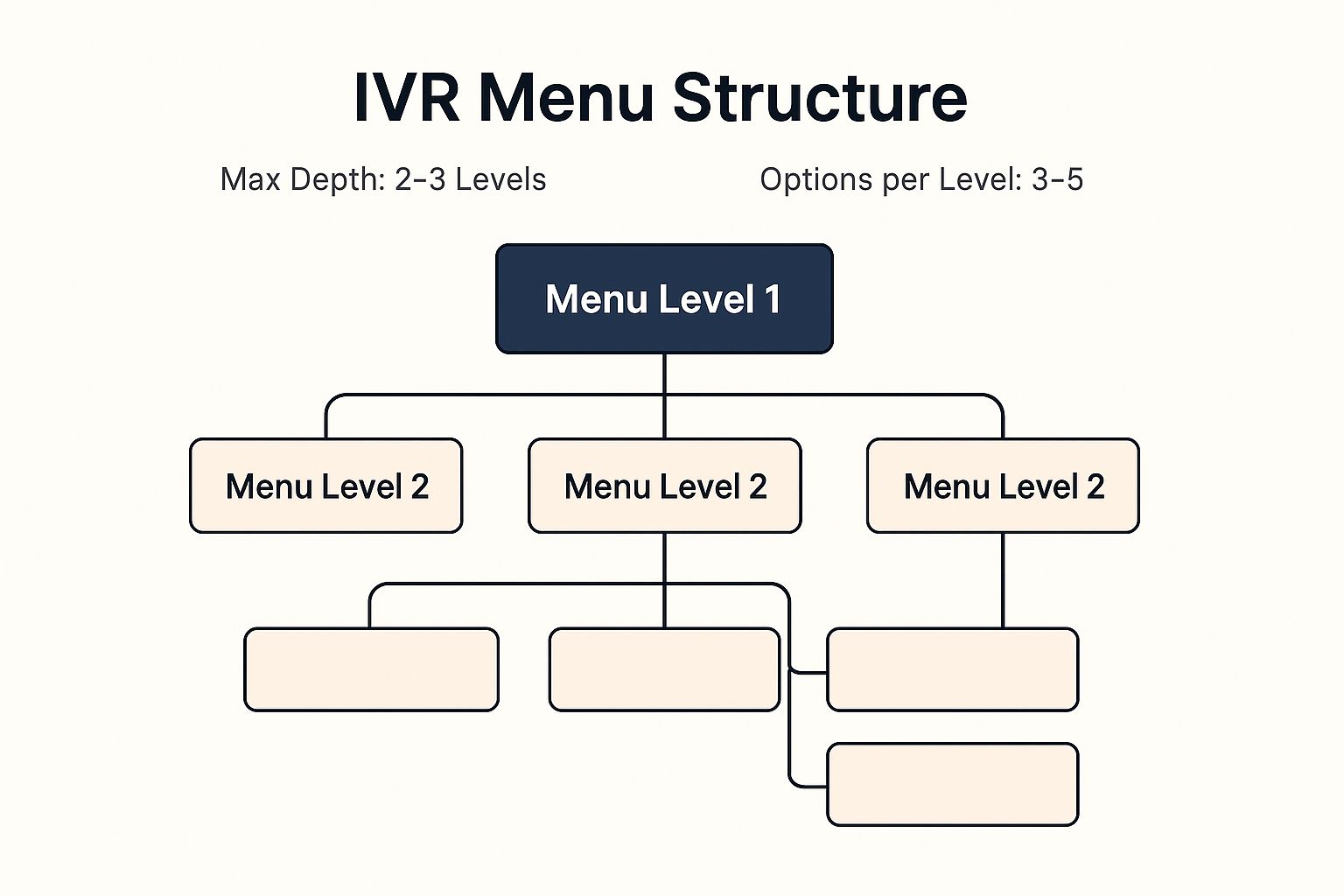
This visualisation reinforces that an optimal IVR limits both the depth of its menus and the number of choices presented at any given time, preventing cognitive overload.
Actionable Tips for Implementation
- Use Card Sorting: Before you finalise your menu, conduct card sorting exercises with a sample of your actual customers. Write down potential menu options on individual cards and ask users to group them in a way that feels logical to them. This user-centred approach reveals natural hierarchies you might not have considered.
- Analyse Call Flow Data: Your existing call data is a goldmine. Regularly analyse where callers are dropping off, which menu options are used most frequently, and which paths lead to the quickest resolutions. Use this insight to trim unnecessary options and streamline the most common user journeys.
- Provide Clear Escape Routes: Always include an option to speak with a human agent, return to the main menu, or repeat the options. This prevents callers from feeling trapped and reduces the likelihood they will simply hang up in frustration.
By focusing on a shallow and simple menu architecture, you are laying the foundation for a positive customer experience, one that values their time and resolves their needs efficiently. For a more in-depth exploration of this topic, you can read more about keeping IVR menus simple and effective on Voicetta.com.
2. Provide Clear Audio and Professional Voice Quality
Picture this: you call a company for urgent support, but the voice on the other end is muffled, robotic, and riddled with static. The prompts are spoken so quickly you miss the options, or so slowly you feel your patience fraying. This poor audio experience immediately signals a lack of professionalism and care, frustrating the caller before they even have a chance to state their problem. Just as a well-designed website is visually appealing, an IVR system must be audibly appealing and, above all, clear.
High-quality audio is a non-negotiable component of modern IVR design best practices. It involves more than just hitting 'record'; it requires professional voice talent, proper recording equipment, and sound engineering to ensure every word is crisp, clear, and evenly paced. This voice is the sonic representation of your brand, and its quality directly influences customer perception. A clear, warm, and professional voice builds trust and conveys competence, while poor audio creates an immediate barrier, leading to misunderstandings, repeated prompts, and caller hang-ups. Investing in professional audio is investing in your brand's reputation and your customer's first impression.

Setting the Tone for Your Brand
The voice you choose becomes the audible personality of your company. It should be carefully selected to align with your brand identity. For instance, a financial institution like Chase uses calm, authoritative voice qualities to project trustworthiness and security. In contrast, a customer-centric brand like Zappos employs a warm, friendly, and enthusiastic tone to mirror their renowned service culture. The key is consistency; the voice should sound like it belongs to your brand.
Pioneers in voice technology like Nuance Communications and Avaya have long emphasised the importance of professional voice talent in creating effective user experiences. Platforms like Voice123 have made it easier than ever to find the right voice actor whose tone, pace, and accent fit your specific customer base. Consistency is crucial, not just in tone but in technical quality. All prompts should be recorded in the same session with the same equipment to avoid jarring shifts in volume or background noise, ensuring a seamless and professional journey for the caller.
Actionable Tips for Implementation
- Audition and Select Wisely: Don’t just pick the first voice you hear. Audition several professional voice actors. Ask them to read a sample script that reflects the tone you want, from empathetic and reassuring to energetic and efficient.
- Test on Multiple Devices: Audio can sound different across various networks and devices (e.g., landline, mobile on speakerphone, VoIP). Test your recordings on multiple carriers and phone types to ensure clarity and consistency for all callers.
- Plan for the Future: When you hire voice talent, secure their contact information and discuss their availability for future updates. Having the same voice actor record new prompts maintains brand consistency and prevents a disjointed user experience down the line.
- Script for Clarity: Write your scripts to be spoken. Read them aloud to catch awkward phrasing. For complex terms, company names, or technical jargon, consider recording a few phonetic variations and test which one is most easily understood by callers.
3. Always Offer Live Agent Option
Picture this: you've navigated an IVR menu, but your issue is unique and doesn't fit neatly into any of the predefined boxes. You try rephrasing your request, but the system doesn't understand. Frustration mounts with every repeated prompt. This is the moment where an IVR system either retains a customer or loses them forever. Providing a clear, persistent, and easily accessible option to connect with a human agent is not just a feature; it's a fundamental expression of customer respect and a critical safety valve for the entire system.
This best practice, often called an "escape hatch," acknowledges that no automated system can predict every customer need. By allowing callers to press '0' or say "speak to an agent" at any point, you empower them. You send a clear message that their problem is important and that you are prepared to provide personalised support when self-service fails. This simple provision transforms a potentially infuriating experience into a manageable one, dramatically reducing call abandonment and protecting your brand's reputation. It is an essential component of user-centric IVR design best practices.
Structuring for Support
Integrating a live agent option should be a deliberate design choice, not an afterthought hidden deep within the menu. The option should be announced clearly in the main menu and remain available in all subsequent sub-menus. This consistency assures callers that help is always just one button-press away, giving them the confidence to attempt self-service first, knowing they won't get trapped.
Leading companies excel at this. American Express, for instance, often presents the option to speak with a "Customer Care Professional" as one of its primary main menu choices. Comcast allows users to press '0' at any prompt to be redirected to a queue for technical or billing support. Similarly, many medical practices and healthcare providers ensure their IVR includes an immediate option to connect to a nurse line or reception for urgent concerns, recognising that some issues simply cannot be automated. These examples highlight a commitment to resolving customer issues, regardless of their complexity.
Actionable Tips for Implementation
- Make the Option Clear and Consistent: Announce the option to reach an agent (e.g., "To speak with a representative at any time, press zero") in the initial welcome message and ensure the '0' key functions as an escape hatch from every sub-menu.
- Provide Realistic Wait Time Estimates: If a caller opts for a live agent, be transparent about their place in the queue. Informing them that "the current estimated wait time is five minutes" manages expectations far better than silence or repetitive hold music.
- Offer Callback Options: During peak hours when wait times are long, implement a virtual queuing system. Offer to call the customer back when it's their turn, freeing them from having to wait on the line. This small courtesy significantly improves the customer experience.
- Train Agents on IVR Escalation Points: Equip your agents with context. When a call is transferred, the agent should know which IVR menu the caller was in. This allows them to anticipate the customer's needs and avoid forcing the caller to repeat their entire story.
By always providing a direct line to human support, you build a safety net that catches frustrated customers and reinforces their trust in your brand. This approach ensures your IVR serves as a helpful tool, not a frustrating barrier. To further refine this crucial handoff, you can read more about real-time agent assistance on Voicetta.com.
4. Use Data-Driven Menu Prioritisation
Consider the frustration of calling a retail company during the festive season, only to find the "Order Status" option buried under four other choices you don't need. The most common reason for your call is the hardest to find. This highlights a powerful, yet often overlooked, strategy in IVR design: letting your customers’ behaviour dictate your menu structure. Instead of organising options based on internal departments or assumptions, data-driven prioritisation uses real-world analytics to place the most frequently requested services at the forefront.
This approach transforms the IVR from a static, one-size-fits-all directory into a dynamic and responsive tool that anticipates user needs. By analysing call volume data, you can ensure that the majority of your callers find their required option first, drastically shortening their time in the system and boosting satisfaction. It’s a core component of effective IVR design best practices because it directly aligns the system's architecture with the primary reasons customers are calling in the first place, creating a more efficient path to resolution for the largest segment of your audience.
Structuring for Success
A data-driven menu is not set in stone; it adapts to changing customer needs. For instance, a telecommunications company might notice that billing enquiries spike in the first week of the month. By temporarily moving the 'Billing and Payments' option to the top of the menu during this period, they can serve a huge portion of their callers instantly. Similarly, an insurance company would elevate 'File a Claim' to the primary position immediately following a major regional weather event, streamlining access for affected policyholders.
This dynamic adjustment is championed by analytics platforms from providers like Genesys and Five9, which enable businesses to visualise call flow patterns and identify high-volume contact reasons. Retail companies master this during peak seasons like Black Friday or Christmas, promoting 'Track My Order' and 'Returns Information' to handle the surge in logistical queries. This proactive structuring demonstrates a deep understanding of the customer journey and proves that the system is designed for the user’s convenience, not the company's internal organisation.
Actionable Tips for Implementation
- Analyse Call Data Monthly: Establish a regular schedule to review your IVR analytics. Look for trends, high-volume paths, and points of abandonment. This consistent review will help you identify which menu options are the most critical to your callers over time.
- Consider Time and Seasonal Variations: Do not treat your call data as a single, flat dataset. Segment your analysis by time of day, day of the week, and season to uncover patterns. This allows you to implement dynamic menu changes that reflect real-time customer behaviour.
- Use Heat Mapping to Visualise Usage: Many modern contact centre platforms offer heat maps or flow visualisations. Use these tools to see at a glance which menu items receive the most traffic and which are consistently ignored. This can help you declutter your IVR and prioritise effectively.
- Implement Changes Gradually: When you reorganise your menu, do it incrementally and inform your customers if possible. Regular callers develop muscle memory for your IVR, and sudden, drastic changes can cause confusion and negate the benefits of the new structure.
By leveraging data, you move from guessing what customers want to knowing what they need. This focus on analytics is fundamental to improving key performance indicators. For a deeper understanding of which metrics to track, you can read more about crucial customer support KPIs on Voicetta.com.
5. Enable Speech Recognition and Dual-Tone Input
Consider a caller trying to navigate your IVR while driving, hands firmly on the wheel, or a customer with a physical disability that makes using a keypad difficult. In these scenarios, a touch-tone-only system is not just inconvenient; it's a barrier to service. Forcing every caller into the rigid "press 1, press 2" paradigm ignores the diverse needs and contexts of your audience. The solution is to offer flexibility through a dual-input approach, combining modern speech recognition with traditional Dual-Tone Multi-Frequency (DTMF) or touch-tone input.
This best practice is centred on creating a more accessible and user-friendly experience by giving callers a choice. By allowing them to either speak their responses or press a key, you cater to personal preference, situational constraints like driving, and accessibility requirements. This flexibility significantly reduces friction and frustration, demonstrating that your system is designed around the customer, not the other way around. Powering this are advanced technologies like Google Cloud Speech-to-Text and Amazon Lex, which have made conversational IVRs more accurate and reliable than ever.
Structuring for Success
A dual-input system is more than just a technological feature; it’s a core component of inclusive design. When implementing it, the key is to make both options clear and equally viable. For instance, a prompt should be phrased as, "For billing, say 'billing' or press 1". This simple instruction empowers the user from the start. It's a foundational element of IVR design best practices because it acknowledges that there is no one-size-fits-all solution for customer interaction.
Leading companies have successfully integrated this model. Airlines like Delta allow travellers to either say their confirmation number or type it on the keypad, accommodating users who might be multitasking or in a noisy airport. Similarly, modern healthcare IVRs often use this dual approach to better serve elderly patients who may find speaking more natural than navigating a keypad. The goal is to create a seamless experience where the technology adapts to the user, not the other way around, ensuring that every caller can navigate the system with ease and confidence.
Actionable Tips for Implementation
- Announce Both Options Clearly: Always start your menu prompts by explicitly stating both methods of interaction. For example: "You can say 'technical support' or press 2". This immediately informs the caller of their choices.
- Test with Diverse Accents: Your speech recognition engine should be rigorously tested with a wide range of accents, dialects, and speaking styles representative of your actual customer base. This prevents bias and ensures the system is equitable for all users.
- Implement Confidence Thresholds: Set up your speech recognition software with confidence scores. If the system's confidence in understanding a spoken phrase is below a certain threshold, it should politely ask the caller to repeat themselves or offer the touch-tone alternative, preventing misrouting.
- Design Clear Error Recovery: Create a graceful recovery path for when speech recognition fails. After one or two failed attempts, the system should automatically default to a touch-tone-only prompt or offer a direct transfer to a live agent to avoid a frustrating loop.
By integrating both speech and touch-tone inputs, you build a resilient and accommodating IVR that serves a broader audience more effectively. If you'd like to explore this further, you can learn more about how to enable speech recognition and dual-tone input on Voicetta.com.
6. Implement Smart Call Routing and Context Awareness
Imagine calling your internet provider during a known service outage. Instead of navigating a standard menu, the IVR greets you with, “We’ve detected a service issue in your area and our technicians are working to resolve it. We expect service to be restored by 3 PM.” This isn’t magic; it’s a context-aware IVR. By using data you already have about your customer, you can transform a generic, often frustrating interaction into a hyper-relevant and efficient one. This intelligent approach anticipates the caller’s needs before they even speak a word.
This best practice moves beyond a static, one-size-fits-all phone tree. It involves integrating your IVR with other business systems, like your Customer Relationship Management (CRM) software, to create a dynamic and personalised experience. Using data such as the caller’s phone number (Caller ID), their recent purchase history, or their support ticket status, the system can make intelligent routing decisions. It stops forcing customers to repeat information they know you already have and instead treats them like a valued, recognised individual. This is a cornerstone of modern IVR design best practices, shifting the focus from system-led navigation to customer-centric problem-solving.
Structuring for Success
A context-aware system routes callers based on their unique profile and situation. For example, a banking IVR can identify a high-value client from their phone number and immediately route them to a dedicated relationship manager, bypassing the general queue entirely. A telecommunications company can use location data linked to a caller's number to proactively inform them of regional network issues. Similarly, an e-commerce platform can check a caller’s order history and offer tailored options like, “Are you calling about your recent order for a blue coffee maker?”
Major service platforms have popularised this approach. Systems like Salesforce Service Cloud and Zendesk Talk are built to provide a 360-degree customer view, allowing their integrated IVR systems to make these smart decisions. This proactive assistance not only resolves issues faster but also demonstrates that you understand and value your customer's journey. It’s the difference between being greeted by a stranger and being welcomed by a helpful assistant who already knows why you might be calling.
Actionable Tips for Implementation
- Integrate with Your CRM: Connect your IVR to your CRM to access a complete customer view. This allows the system to use data like account status, past interactions, and customer value to inform routing logic and personalise greetings.
- Utilise Progressive Profiling: Don’t try to capture all information at once. Use each interaction to subtly gather and confirm data, gradually building a richer customer profile over time. This makes future calls even more efficient and personalised.
- Test Routing Logic Rigorously: Before going live, test your smart routing rules with a wide variety of customer scenarios. Create test cases for new customers, VIP clients, customers with open support tickets, and callers from outage-affected areas to ensure the logic works as intended.
- Prioritise Data Privacy and Transparency: Be transparent with customers about how their data is being used to enhance their experience. Ensure your system complies with all relevant data protection regulations, like GDPR, to build and maintain customer trust.
7. Optimise for Mobile and Poor Connection Quality
Picture a customer calling for support while walking down a busy city street, their mobile signal fluctuating with every step. Suddenly, a passing siren drowns out the IVR prompt, or the call drops just as they're confirming their details. This isn't an edge case; it's the reality for a huge percentage of callers in today's mobile-first world. Failing to design for mobile users and their often-unstable connections is a surefire way to alienate customers and undermine your service quality. An IVR built solely for perfect, landline-like conditions is an IVR built to fail.
Optimising for mobile involves anticipating and mitigating the unique challenges of mobile communication. This means designing for background noise, potential disconnections, and slower data speeds that can affect voice quality. It requires building a resilient system that doesn't just give up when a connection falters. This approach acknowledges that the customer's environment is unpredictable, and it makes the IVR a more robust and reliable tool. This focus on resilience is a cornerstone of modern IVR design best practices, ensuring your system is accessible to everyone, everywhere.
Structuring for Success
A mobile-optimised IVR must be forgiving and flexible. For instance, if the system fails to recognise a user's voice input, it shouldn't immediately transfer them or end the call. Instead, it could offer a touch-tone (DTMF) alternative or repeat the prompt more slowly and clearly. This adaptability is crucial for maintaining a positive user experience even when the connection is less than ideal.
Leading service-oriented companies demonstrate this principle effectively. Uber's support line, for example, is designed to handle calls from drivers and riders who are often on the move in noisy environments. The system uses shorter prompts and can offer to send an SMS with a link to a web-based support form if the connection quality is too poor for a voice interaction. Similarly, many emergency services have redundant protocols that can re-establish a dropped call or switch to a text-based communication channel, recognising that a stable connection can't be taken for granted in a crisis.
Actionable Tips for Implementation
- Test on Diverse Networks: Don't just test your IVR on your office's high-speed Wi-Fi. Test it extensively across various mobile carriers, in areas with known poor reception (like basements or rural locations), and on different generations of mobile networks (3G, 4G, 5G) to identify and fix potential failure points.
- Keep Prompts Short and Clear: Long, complex sentences are difficult to comprehend on a low-quality mobile connection or with background noise. Use concise, simple language for your prompts. For example, instead of "Please tell me your full account number now," try "What is your account number?".
- Implement Smart Error Handling: Design your system to handle misinterpretations gracefully. If a voice command isn't understood, have the IVR say, "Sorry, I didn't get that. Could you please repeat it?" rather than just dead-ending the call. Implement connection recovery logic that attempts to reconnect a dropped call or saves the caller's place in the menu.
- Offer Multichannel Alternatives: Provide users with an easy way to switch channels. Integrate options to receive information via SMS or to continue the interaction in a mobile app. This gives users a way out if the voice channel becomes untenable, preventing complete communication breakdown.
7 Key IVR Design Best Practices Comparison
| Strategy | Implementation Complexity 🔄 | Resource Requirements 💡 | Expected Outcomes 📊 | Ideal Use Cases 💡 | Key Advantages ⭐⚡ |
|---|---|---|---|---|---|
| Keep Menu Levels Shallow and Simple | Low to Medium 🔄 | Moderate (design & testing) 💡 | Reduced caller frustration 📊, faster navigation ⚡ | Simple to medium organizations with distinct services 💡 | Reduces errors ⭐, improves satisfaction ⭐ |
| Provide Clear Audio and Professional Voice Quality | Medium 🔄 | High (professional talent, recording) 💡 | Clear communication 📊, enhanced brand image ⭐ | Any IVR needing strong brand presence and accessibility 💡 | Reduces misunderstandings ⭐, enhances trust ⭐ |
| Always Offer Live Agent Option | Medium 🔄 | High (staffing & call handling) 💡 | Increased customer satisfaction 📊, reduces abandonment 📊 | Complex issues, high-value customer service 💡 | Safety net for users ⭐, prevents frustration ⭐ |
| Use Data-Driven Menu Prioritization | High 🔄 | High (analytics & monitoring) 💡 | Faster call handling 📊, higher self-service rates ⚡ | Dynamic environments with variable call patterns 💡 | Improves efficiency ⭐, measurable ROI 📊 |
| Enable Speech Recognition and Dual-Tone Input | High 🔄 | High (speech tech & maintenance) 💡 | Faster navigation for some users ⚡, better accessibility ⭐ | Diverse user base, multi-language support needed 💡 | Accommodates many preferences ⭐, reduces errors ⭐ |
| Implement Smart Call Routing and Context Awareness | Very High 🔄 | Very High (integration, CRM systems) 💡 | Personalized experience 📊, higher first-call resolution ⭐ | Enterprises with rich customer data & CRM 💡 | Cuts redundant steps ⭐, increases satisfaction ⭐ |
| Optimize for Mobile and Poor Connection Quality | High 🔄 | Moderate to High (testing & QA) 💡 | Improved completion rates 📊, reduced mobile-user frustration ⚡ | Mobile-first callers, poor network conditions 💡 | Future-proofs IVR ⭐, boosts mobile usability ⭐ |
Crafting the Future of Your Customer Conversations
Navigating the landscape of Interactive Voice Response systems can often feel like a journey through a digital maze. However, the path to a truly customer-centric experience is not paved with complexity but with clarity, empathy, and intelligent design. As we have explored, the principles that transform a frustrating phone tree into a seamless conversational gateway are accessible and, more importantly, essential for any modern organisation. By embracing these IVR design best practices, you move beyond mere call deflection and begin to build a powerful engine for customer satisfaction and loyalty.
The journey we have taken through these seven core principles paints a clear picture: exceptional IVR design is a holistic endeavour. It is not about implementing a single high-tech feature but about weaving together multiple threads of thoughtful design into a cohesive and respectful customer experience. From the foundational decision to keep menu levels shallow and simple, ensuring callers are not trapped in an endless loop, to the critical need for clear audio and professional voice quality that builds immediate trust, each practice lays a crucial brick in the foundation of effective communication.
From Frustration to Fruition: Key Takeaways
The true power of these strategies lies in their interconnectedness. Consider how offering a clear and early option to connect with a live agent acts as a safety net, reassuring customers that help is always within reach. This simple act of giving back control dramatically reduces caller frustration and complements the efficiency gained from other optimisations.
Similarly, leveraging data-driven menu prioritisation is not just a technical tweak; it is a direct response to your customers' collective voice. By analysing call data to place the most common queries at the forefront, you demonstrate that your organisation listens and adapts, transforming the IVR from a static directory into a dynamic, responsive tool. This data-first approach is the very essence of modern IVR design best practices.
The Next Steps on Your IVR Optimisation Journey
Putting these insights into action is the next critical step. To begin your transformation, consider this actionable roadmap:
- Conduct a Comprehensive IVR Audit: Map out your current call flows, menu structures, and audio prompts. Identify points of high abandonment, confusing language, and unnecessarily deep menu levels.
- Gather Customer Feedback: Do not just rely on system data. Use post-call surveys or direct interviews to understand the qualitative experience. What frustrates your callers? Where do they get lost? What would make their journey easier?
- Prioritise and Implement: Based on your audit and feedback, prioritise which of the seven best practices will deliver the most immediate impact. Perhaps it is a simple win, like re-recording your audio prompts with a professional voice artist. Or maybe it is a more significant project, like implementing smart call routing that uses CRM data to personalise the caller's journey.
- Test, Measure, and Iterate: IVR design is not a one-time project. Continuously monitor key performance indicators like call containment rates, transfer rates to agents, and customer satisfaction scores. Use A/B testing for different menu options or prompts to find what works best.
The ultimate goal is to create an IVR system that feels less like a machine and more like a helpful concierge. It is about building a system so intuitive and efficient that the technology becomes invisible, allowing the customer to focus solely on the resolution. By enabling both speech recognition and traditional dual-tone input, you cater to diverse user preferences and environments. By optimising for mobile callers and potential poor connections, you acknowledge the reality of your customers' lives and design for resilience.
Investing in these IVR design best practices is a strategic imperative. It is a direct investment in your brand's reputation, operational efficiency, and the long-term value of your customer relationships. The era of clunky, one-size-fits-all phone systems is decisively over. The future belongs to intelligent, adaptive, and human-centric communication platforms.
Ready to transform your IVR from a necessary cost centre into your most valuable customer service asset? Discover how Voicetta’s AI-powered platform makes implementing these advanced IVR design best practices simple and effective, creating conversations that build loyalty and drive growth. Explore the future of customer communication at Voicetta.
Was this useful?
If this article helped, add Voicetta as a preferred source in Google Search. Your results can then highlight our writing.
Add as preferred source