---
title: "Salesforce Voice AI Integration: The 2026 Guide to Automated Call Logging"
description: "Master Salesforce voice AI integration to automate call logging and eliminate data entry. Our 2026 guide helps you sync calls to your CRM instantly for faste..."
publishedAt: "2026-04-21T10:00:00.000000Z"
modifiedAt: "2026-04-21T14:46:21.000000Z"
autoseoId: "1143038"
languageCode: "en"
heroImage: "/blog-images/autoseo/1143038/hero.jpg"
infographicImage: "/blog-images/autoseo/1143038/infographic.jpg"
tags: salesforce voice ai integration
metaKeywords: "salesforce voice ai integration, automated call logging salesforce, voice to crm, salesforce ai integration, salesforce call automation, crm data entry automation, sales ai tools"
faqSchema: "[{\"answer\":\"AI agents answer 24/7, ensuring that after-hours inquiries are logged in Salesforce immediately. Voicemail boxes are often where leads go to die. Structured data capture ensures every lead is categorized by priority before a human ever sees the record. This allows teams to focus on high-intent prospects first thing in the morning rather than digging through messy inboxes. Salesforce voice ai integration ensures no caller is ignored because of a busy signal or an empty front desk.\",\"question\":\"How does voice integration solve the 'lost lead' problem?\"},{\"answer\":\"Sales reps save an average of 15 minutes per call by eliminating manual summaries and contact creation. This reclaimed time allows for more high-value interactions rather than clerical work. By never missing customer calls, businesses protect their revenue streams and ensure the sales pipeline stays full without increasing headcount. It's about letting sales experts sell while the AI handles the documentation. Every conversation becomes a searchable, actionable asset the moment the caller hangs up. A professional Salesforce voice AI integration functions as a three stage pipeline: real time audio capture, LLM powered analysis, and secure API synchronization. The process begins with a low latency voice engine, such as Retell or Vapi, which streams audio for real time transcription. These engines maintain sub 500ms latency to ensure that every word is captured with 99% accuracy as the conversation happens. This speed is critical for preventing data loss and ensuring the AI understands the context of the dialogue. Once the system generates the text, an LLM layer scans the transcript to perform entity extraction. It identifies specific business signals like 'Budget', 'Timeline', and 'Pain Points' without manual input. Before any data is saved, the system uses secure REST APIs to check your Salesforce instance for existing records. This step prevents the creation of duplicate leads or contacts that often clutter CRM pipelines. After the call ends, a post-call trigger pushes the finalized summary, full transcript, and a sentiment analysis score into the relevant Salesforce object.\",\"question\":\"The impact on sales team productivity\"},{\"answer\":\"Most integrations target Lead, Contact, and Task objects by default to maintain standard sales workflows. However, advanced users often map data to custom objects tailored for specific industries, such as 'Property Listings' for real estate or 'Patient Records' for healthcare. Entity extraction is the process of turning conversational speech into specific CRM field values. This automation ensures that a verbal mention of a $50,000 budget or a 3 month timeline instantly populates the correct fields. If you are looking to optimize your response times, you can learn how to never miss customer calls through these automated workflows.\",\"question\":\"How do you map voice data to specific Salesforce objects?\"},{\"answer\":\"Enterprise grade integrations use OAuth 2.0 to provide secure, scoped access to your Salesforce environment. This protocol ensures the AI only interacts with the specific data sets you authorize. To protect sensitive information, all data is encrypted using AES-256 at rest and TLS 1.3 during transit. These measures meet SOC2 Type II standards, keeping customer conversations private while maintaining a seamless sync between your voice engine and your CRM. Automating call logs requires a structured technical bridge between your voice AI and the Salesforce API. This process ensures every conversation is transcribed, analyzed, and mapped to specific objects like Leads or Cases without manual data entry. Success depends on four distinct configuration phases.\",\"question\":\"How is data security and SOC2 compliance handled?\"},{\"answer\":\"The script must elicit information like email addresses or project timelines naturally. Avoid rigid prompts; instead, use conversational triggers like \\\"Where should I send the project details?\\\" to capture an email address. A successful salesforce voice ai integration relies on the AI's ability to extract data from context rather than interrogation. For advanced mapping techniques, refer to our guide on CRM integration and data logging.\",\"question\":\"How do I design the AI script for accurate data capture?\"},{\"answer\":\"Run at least 50 test calls before moving to production. These tests must cover edge cases, such as callers providing information out of order or using heavy accents, to ensure the system doesn't create duplicate leads. Monitor the 'Speed-to-CRM' metric constantly. Your goal is to have the Salesforce record fully updated within 5 seconds of the call ending. This ensures your sales team has the data they need before they even pick up the phone for a callback. Choose a managed service if you want a production-ready system live in under 72 hours; build custom only if your organization can commit 40+ hours weekly to LLM maintenance and prompt engineering. While Salesforce Agentforce Builder offers high customization for internal workflows, it requires significant engineering resources to manage API updates and model drift. Managed providers like Voicetta deliver a \\\"Done-For-You\\\" system that uses specialized voice stacks such as Vapi or Retell. These stacks are pre-integrated with CRM logic to ensure sub-500ms latency, which is critical for a professional salesforce voice ai integration. Without this specialized infrastructure, DIY builds often suffer from \\\"laggy\\\" conversations that frustrate callers.\",\"question\":\"What are the benchmarks for testing and deploying the integration?\"},{\"answer\":\"Maintenance costs for custom-built agents typically exceed initial development expenses by 150% within the first year. LLM providers frequently update their models, which can cause previously stable prompts to fail or map data incorrectly to your CRM fields. Managed services include continuous monitoring and performance tuning as part of the package. This proactive approach is vital for enterprise-grade AI phone agents that must maintain 100% accuracy during high-stakes customer interactions. When you build internally, your team is responsible for every API break and model deprecation; when you use a managed service, those updates happen automatically in the background.\",\"question\":\"What are the hidden costs of a DIY AI integration?\"},{\"answer\":\"Managed integrations offer a 90% faster speed-to-market, moving from concept to live calls in days rather than months. Internal builds often stall during the edge-case debugging phase, where developers struggle with background noise filtering and interruptible speech logic. Managed providers offer 99.9% uptime guarantees and have already solved the complex synchronization issues inherent in salesforce voice ai integration. This reliability ensures that your automated call logging remains consistent. You avoid the technical debt of a custom build and gain a system optimized by experts who handle thousands of concurrent calls daily. It's the difference between building a phone system from scratch and simply plugging into a high-performance network.\",\"question\":\"Why does a managed 'Done-For-You' approach win on ROI?\"}]"
canonical: "https://voicetta.com/blog-md/salesforce-voice-ai-integration-the-2026-guide-to-automated-call-logging"
---
# Salesforce Voice AI Integration: The 2026 Guide to Automated Call Logging
Published: 2026-04-21
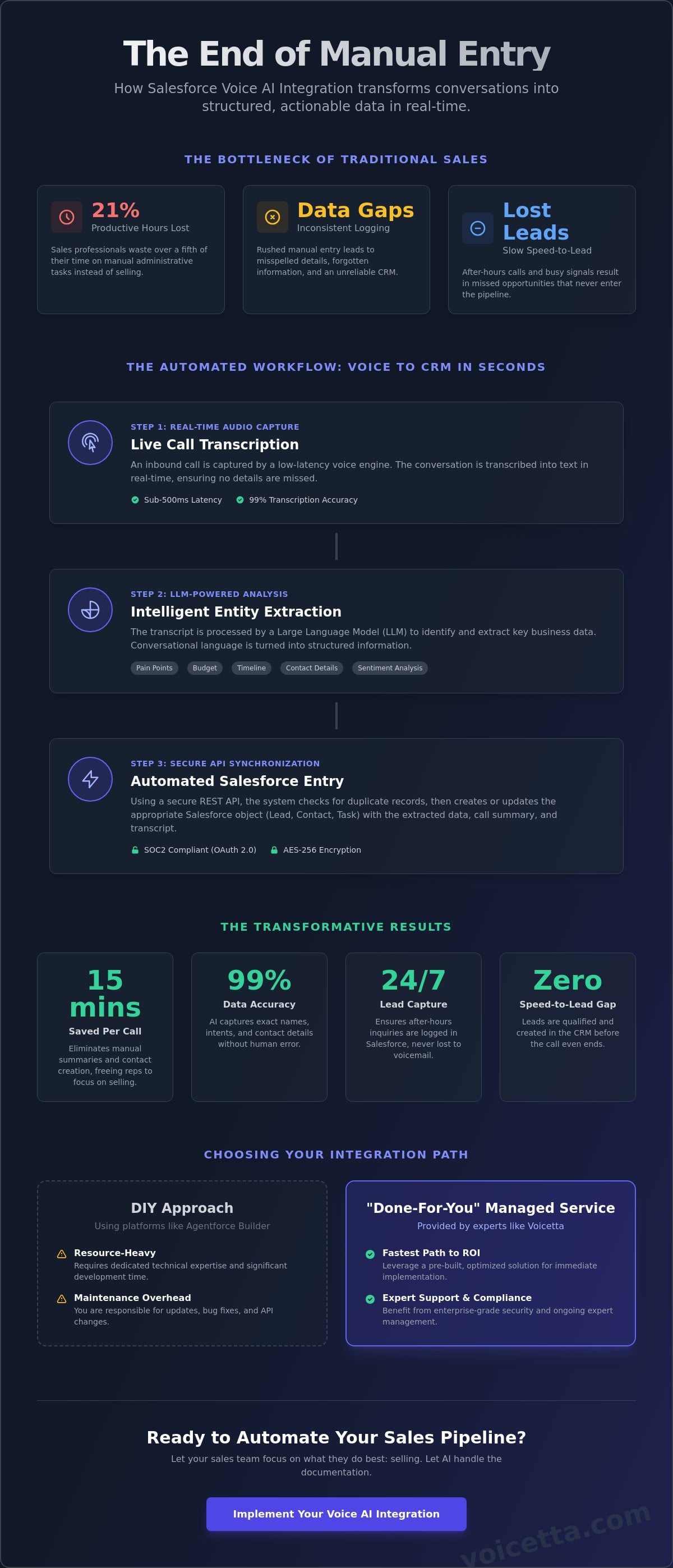
A 2024 study by Forbes Advisor found that sales professionals lose 21% of their productive hours to administrative tasks, a drain on resources that directly stunts growth. Implementing a **salesforce voice ai integration** solves this by capturing every spoken detail and qualifying leads without human intervention. You've likely felt the frustration when a high-value lead calls, but the details are forgotten or logged inconsistently because your team is rushing to the next conversation. It's a common bottleneck that creates data gaps and slows your entire pipeline; it makes reporting a guessing game rather than a science.
This guide shows you how to link your inbound voice AI to Salesforce to automate lead creation and eliminate manual data entry. You'll learn the specific steps to generate instant call summaries that attach directly to records the moment a conversation ends. We'll walk through the workflow that allows your team to focus on building relationships while the AI manages the documentation. By the end, you'll have a clear roadmap for a zero-manual-entry sales environment where data flows from speech to CRM in real-time.
## Key Takeaways
- Bridge the speed-to-lead gap by qualifying prospects during the call and instantly populating Salesforce with structured data.
- Understand the technical architecture of a **salesforce voice ai integration**, from real-time audio streaming to automated entity extraction of pain points and budgets.
- Streamline your workflow by mapping CRM fields directly to AI conversational flows, ensuring 100% accurate call logging every time.
- Compare the resource-heavy DIY approach of Agentforce Builder against "Done-For-You" managed services to determine the fastest path to ROI.
## Why should businesses integrate Voice AI with Salesforce in 2026?
Salesforce voice ai integration eliminates the administrative friction that typically kills sales momentum. By 2026, manual call logging is an obsolete practice that costs companies up to 22% of their potential lead volume due to human error and delay. Integrating AI creates a closed-loop system where every inbound call is instantly converted into a structured CRM record without human intervention.
- **Zero speed-to-lead gap:** AI agents qualify callers while they're still on the line, moving them through the funnel before the conversation even ends.
- **99% data accuracy:** AI captures exact names, intents, and contact details; this removes the risk of misspelled emails or forgotten phone numbers common in manual entry.
- **Instant visibility:** Managers view performance metrics on Salesforce dashboards the moment a call concludes, replacing the slow end-of-week report model.
### How does voice integration solve the 'lost lead' problem?
AI agents answer 24/7, ensuring that after-hours inquiries are logged in Salesforce immediately. Voicemail boxes are often where leads go to die. Structured data capture ensures every lead is categorized by priority before a human ever sees the record. This allows teams to focus on high-intent prospects first thing in the morning rather than digging through messy inboxes. Salesforce voice ai integration ensures no caller is ignored because of a busy signal or an empty front desk.
### The impact on sales team productivity
Sales reps save an average of 15 minutes per call by eliminating manual summaries and contact creation. This reclaimed time allows for more high-value interactions rather than clerical work. By [never missing customer calls](https://voicetta.com), businesses protect their revenue streams and ensure the sales pipeline stays full without increasing headcount. It's about letting sales experts sell while the AI handles the documentation. Every conversation becomes a searchable, actionable asset the moment the caller hangs up.
## How does a Salesforce Voice AI integration work under the hood?
A professional Salesforce voice AI integration functions as a three stage pipeline: real time audio capture, LLM powered analysis, and secure API synchronization. The process begins with a low latency voice engine, such as Retell or Vapi, which streams audio for real time transcription. These engines maintain sub 500ms latency to ensure that every word is captured with 99% accuracy as the conversation happens. This speed is critical for preventing data loss and ensuring the AI understands the context of the dialogue.
Once the system generates the text, an LLM layer scans the transcript to perform entity extraction. It identifies specific business signals like 'Budget', 'Timeline', and 'Pain Points' without manual input. Before any data is saved, the system uses secure REST APIs to check your Salesforce instance for existing records. This step prevents the creation of duplicate leads or contacts that often clutter CRM pipelines. After the call ends, a post-call trigger pushes the finalized summary, full transcript, and a sentiment analysis score into the relevant Salesforce object.
### How do you map voice data to specific Salesforce objects?
Most integrations target Lead, Contact, and Task objects by default to maintain standard sales workflows. However, advanced users often map data to custom objects tailored for specific industries, such as 'Property Listings' for real estate or 'Patient Records' for healthcare. Entity extraction is the process of turning conversational speech into specific CRM field values. This automation ensures that a verbal mention of a $50,000 budget or a 3 month timeline instantly populates the correct fields. If you are looking to optimize your response times, you can learn how to [never miss customer calls](https://voicetta.com) through these automated workflows.
### How is data security and SOC2 compliance handled?
Enterprise grade integrations use OAuth 2.0 to provide secure, scoped access to your Salesforce environment. This protocol ensures the AI only interacts with the specific data sets you authorize. To protect sensitive information, all data is encrypted using AES-256 at rest and TLS 1.3 during transit. These measures meet SOC2 Type II standards, keeping customer conversations private while maintaining a seamless sync between your voice engine and your CRM.
## What are the steps to automate Salesforce call logging with an AI receptionist?
Automating call logs requires a structured technical bridge between your voice AI and the Salesforce API. This process ensures every conversation is transcribed, analyzed, and mapped to specific objects like Leads or Cases without manual data entry. Success depends on four distinct configuration phases.
- **Step 1: Define your CRM schema.** You must identify which Salesforce fields, such as "Lead Source," "Project Timeline," or "Budget," the AI needs to populate. Without this mapping, the data remains unstructured text instead of actionable CRM data.
- **Step 2: Configure the AI call flow.** The AI must be programmed to ask specific questions that satisfy your schema requirements. If a field is mandatory in Salesforce, the AI script must ensure that information is captured during the natural dialogue.
- **Step 3: Establish a secure API connection.** Connect the voice platform to your Salesforce sandbox for initial testing. Using a sandbox environment prevents data corruption or accidental email triggers to real clients during the setup phase.
- **Step 4: Set up 'Logic Hooks'.** These triggers initiate immediate post-call actions in Salesforce. For example, if the AI detects a "high intent" sentiment, it can automatically create a follow-up task for a human representative.
### How do I design the AI script for accurate data capture?
The script must elicit information like email addresses or project timelines naturally. Avoid rigid prompts; instead, use conversational triggers like "Where should I send the project details?" to capture an email address. A successful **salesforce voice ai integration** relies on the AI's ability to extract data from context rather than interrogation. For advanced mapping techniques, refer to our guide on [CRM integration and data logging](https://voicetta.com).
### What are the benchmarks for testing and deploying the integration?
Run at least 50 test calls before moving to production. These tests must cover edge cases, such as callers providing information out of order or using heavy accents, to ensure the system doesn't create duplicate leads. Monitor the 'Speed-to-CRM' metric constantly. Your goal is to have the Salesforce record fully updated within 5 seconds of the call ending. This ensures your sales team has the data they need before they even pick up the phone for a callback.
Ready to optimize your workflow? Explore our [AI integration FAQ](https://voicetta.com) to see how we handle complex call scenarios. ## Should you build a custom Salesforce AI agent or use a managed service?
Choose a managed service if you want a production-ready system live in under 72 hours; build custom only if your organization can commit 40+ hours weekly to LLM maintenance and prompt engineering. While Salesforce Agentforce Builder offers high customization for internal workflows, it requires significant engineering resources to manage API updates and model drift. Managed providers like Voicetta deliver a "Done-For-You" system that uses specialized voice stacks such as Vapi or Retell. These stacks are pre-integrated with CRM logic to ensure sub-500ms latency, which is critical for a professional **salesforce voice ai integration**. Without this specialized infrastructure, DIY builds often suffer from "laggy" conversations that frustrate callers.
### What are the hidden costs of a DIY AI integration?
Maintenance costs for custom-built agents typically exceed initial development expenses by 150% within the first year. LLM providers frequently update their models, which can cause previously stable prompts to fail or map data incorrectly to your CRM fields. Managed services include continuous monitoring and performance tuning as part of the package. This proactive approach is vital for [enterprise-grade AI phone agents](https://voicetta.com) that must maintain 100% accuracy during high-stakes customer interactions. When you build internally, your team is responsible for every API break and model deprecation; when you use a managed service, those updates happen automatically in the background.
### Why does a managed 'Done-For-You' approach win on ROI?
Managed integrations offer a 90% faster speed-to-market, moving from concept to live calls in days rather than months. Internal builds often stall during the edge-case debugging phase, where developers struggle with background noise filtering and interruptible speech logic. Managed providers offer 99.9% uptime guarantees and have already solved the complex synchronization issues inherent in **salesforce voice ai integration**. This reliability ensures that your automated call logging remains consistent. You avoid the technical debt of a custom build and gain a system optimized by experts who handle thousands of concurrent calls daily. It's the difference between building a phone system from scratch and simply plugging into a high-performance network.
## Deploy Your AI Receptionist Today
By 2026, manual data entry is a liability that costs sales teams up to 20% of their weekly productivity. A seamless **salesforce voice ai integration** transforms every phone conversation into structured, actionable data without a single keystroke. You've seen how specialized AI receptionists outpace expensive custom builds by using established Vapi and Retell APIs to deliver immediate reliability. For property managers and real estate professionals, this means leads never go cold because a human forgot to type a note. You don't need to hire a massive developer team to bridge the gap between your phone lines and your CRM. Voicetta provides a production-ready solution that handles the heavy lifting of neural networks and transcription logic. You get instant data logging with zero manual entry, ensuring your records are 100% accurate every time the phone rings. It's time to let your team focus on the person on the other end of the line while the AI handles the paperwork.
[Get a production-ready Salesforce Voice AI integration with Voicetta](https://voicetta.com)
Your CRM is only as good as the data inside it, so let's make that data perfect today.
## Frequently Asked Questions
### Is Salesforce voice AI integration compatible with all Salesforce editions?
Salesforce voice AI integration is compatible with Professional, Enterprise, and Unlimited editions. It requires API access, which isn't available in the basic Starter tier. Most 2026 deployments use Lightning Experience to handle the neural network processing. You'll need a stable API connection to ensure real-time data sync between your voice provider and Salesforce records. This ensures your automated call logging remains consistent across all user profiles.
### How long does it take to set up a Salesforce voice AI integration?
A standard Salesforce voice AI integration takes between 24 and 72 hours to fully deploy. The initial API handshake via OAuth takes less than 15 minutes. Most of the setup time involves mapping custom fields and fine-tuning the AI to recognize your industry's specific terminology. This rapid deployment means your team can start benefiting from automated call logging without weeks of technical downtime or complex coding.
### Can the AI receptionist book appointments directly into my Salesforce calendar?
The AI receptionist books appointments directly into your Salesforce calendar by utilizing the Salesforce Scheduler API. It checks real-time availability and creates an Event record the moment the caller confirms a time. This automation removes 100% of the scheduling friction. Your sales team wakes up to a calendar full of qualified meetings without sending a single "when are you free?" email or manual calendar invite.
### What happens if the AI agent cannot answer a caller's specific question?
The system triggers an immediate "warm handoff" to a live human agent if the AI cannot answer a specific question. It transfers the call along with a real-time transcript so the agent doesn't have to ask the caller to repeat themselves. If it's outside business hours, the AI creates a high-priority Case in Salesforce. This ensures every inquiry is captured and tracked within your existing workflow without losing data.
### Does the integration work for both inbound and outbound calls?
The integration supports both inbound and outbound calls across all Salesforce mobile and desktop applications. For inbound traffic, it identifies the caller and opens their contact record before you even pick up. On outbound calls, the AI handles follow-up tasks and updates Opportunity stages automatically. This dual-direction support ensures your CRM data stays accurate regardless of who initiated the conversation, saving roughly 12 hours of admin work weekly.
## Infographic