
Think of your business for a moment. If it were a symphony orchestra, are all the musicians playing in time? Or is it a bit chaotic, with everyone doing their own thing? That's often what it's like when we rely purely on manual tasks. Everyone's busy, but the overall sound is inefficient and, frankly, a bit messy. Business process automation (BPA) is the conductor that steps onto the podium, bringing every instrument—every department and task—into perfect harmony.
Your Automation Journey Starts Here
Let's get one thing straight: this guide isn't about replacing your team with a fleet of robots. It's about empowering them. The whole point of business process automation is to lift the repetitive, soul-crushing work from your team's shoulders. We're talking about those daily grinds that eat up hours but don’t require much brainpower, like endless data entry, compiling the same reports week after week, or manually forwarding customer emails.
Automation steps in like a digital assistant, handling these tasks with incredible precision and speed, 24/7. This gives your talented people the freedom to focus on what they do best—and what actually grows the business. Think innovation, solving tricky problems, and building real relationships with your customers. It's a strategic shift, not just a tech fix.
More Than Just a Tech Upgrade
It’s easy to fall into the trap of seeing business process automation as just another piece of software. It’s not. It's a fundamental change in how your business runs and competes. When you start methodically looking at your workflows, you begin to spot all the hidden bottlenecks and create smoother, more dependable operations from the inside out.
This journey changes your organisation in a few crucial ways:
- Operational Excellence: Your processes get faster, more consistent, and far less susceptible to human error. The result? Higher quality work, every time.
- Employee Empowerment: Your team can finally step away from monotonous labour and into more engaging, strategic roles that build their skills and drive real growth.
- Enhanced Customer Experience: Customers get quicker answers, see fewer mistakes, and enjoy more personalised service. That's how you build lasting loyalty.
Business process automation is about designing an organisation that works smarter, not just harder. It’s about creating a system where technology and human talent work together to achieve peak performance.
What to Expect From This Guide
Starting out with automation can feel like a huge undertaking, but it doesn't have to be overwhelming. We're going to walk you through it, step by step. We'll start with the foundational 'why' behind it all and move right into the practical 'how'. Our mission is to break down the jargon and make these concepts easy to grasp and apply to your specific situation.
In the pages that follow, we'll cover everything from figuring out which processes are ripe for automation to choosing the right tools and measuring your success. We want to give you a clear roadmap, helping you turn the idea of automation into a real, tangible advantage for your business.
What Is Business Process Automation, Really?

Let’s pull back the curtain on business process automation. It might sound a bit technical, but the idea behind it is surprisingly simple. Think about building a piece of furniture from scratch. You could grab a handsaw, a drill, and a screwdriver. It gets the job done, sure, but it's slow, and every single step demands your complete focus and effort.
Now, imagine a pre-programmed machine instead. You feed it the design, and it perfectly cuts the wood, drills the holes, and assembles everything with flawless precision, time after time. That powerful machine is what business process automation does for your company. It takes a whole series of manual, repetitive tasks and knits them together into one seamless, automated workflow that practically runs itself.
The Building Blocks of Automation
Genuine business process automation is so much more than just scheduling a few email reminders. It’s about thoughtfully designing an intelligent system where all the parts work together in perfect harmony. To really get it, you need to understand its three fundamental building blocks:
-
Workflows: This is your master blueprint. A workflow lays out the exact sequence of tasks from beginning to end. It's the journey something takes, like an invoice travelling from the moment it's received, through approval, and finally to payment.
-
Triggers: This is the starting pistol. A trigger is the specific event that kicks off an entire automated workflow. It’s the "if this happens..." part of the equation.
-
Actions: These are the dominoes that fall right after the trigger. Actions are the individual tasks the system carries out automatically once the workflow is running, like sending an email, creating a task in a project manager, or updating a customer record.
The real goal of business process automation is to connect these elements into a reliable, self-operating engine. It’s about shifting your mindset from doing individual tasks to designing entire processes that manage themselves.
Seeing Automation in Action
Let's make this more concrete. A classic example we can all relate to is onboarding a new employee. Done manually, this is often a chaotic mess of checklists, emails, and phone calls. With business process automation, it becomes an elegant, hands-off sequence.
The Workflow: "New Employee Onboarding"
The Trigger: A manager enters the new hire’s details into the HR system and officially marks their status as "Hired."
The Actions: The moment that happens, the system springs to life:
- An automated welcome email is immediately sent to the new employee, complete with their start date and first-day instructions.
- A ticket is automatically created for the IT department to prepare a new laptop and set up all the necessary system accounts.
- The new hire is instantly enrolled in the company’s mandatory compliance training modules.
- A calendar invite for a one-week check-in meeting is sent to their direct manager.
That single trigger sets off a chain reaction that ensures nothing gets missed. The process is consistent, quick, and drastically reduces the chance of human error. It’s a perfect illustration of how automation is all about choreographing a series of steps to get something done with maximum efficiency.
This strategic approach is why its adoption is so tied to the broader IT environment. As artificial intelligence and process automation continue to advance, AI is becoming a crucial piece of the puzzle, helping to boost efficiency and improve the customer experience. You can explore more on how the Polish IT landscape is adapting on focusonbusiness.eu.
The Real-World Benefits of Automating Your Processes
The real magic of business process automation isn't just about speed. It's about fundamentally changing how your business operates. To really get it, let’s look at a story I’ve seen play out time and again: a mid-sized e-commerce company gets swamped by its own success. Their team is drowning in a sea of manual order processing, inventory checks, and customer support tickets. The result? Costly mistakes, burnt-out employees, and frustrated customers.
When they finally turn to automation, it’s not just a band-aid. It’s a complete overhaul. The positive changes ripple through every corner of the company, boosting not just the bottom line but also the happiness of their team and their customers.
A Transformation in Operational Excellence
The first thing they notice is a huge leap in efficiency and a serious drop in costs. Think about it: once you automate tasks like order entry and invoicing, you almost completely wipe out the human errors that creep in during manual data entry. Every single order gets processed flawlessly.
That newfound accuracy creates a powerful domino effect. Fewer mistakes mean fewer returns and fewer support calls from unhappy customers. This frees up the team to tackle more interesting, high-value work. This isn’t a niche goal, either. In the business services sector, where automation has hit an average rate of 21.2 percent, the main drivers are cutting costs (61 percent), delivering services faster (17 percent), and boosting service quality (16 percent). For a deeper look, you can see how the Polish business services sector is driving innovation on ABSL.pl.
Automation isn't about replacing people; it's about giving them superpowers. It takes away the mind-numbing, repetitive work so they can focus on the strategic challenges that actually grow the business.
For our e-commerce company, this meant their staff could finally stop being data-entry clerks. Instead, they started analysing sales patterns, optimising product pages, and cooking up new marketing ideas. You could feel the shift in morale as people realised their work was making a real, tangible impact.
Elevating the Customer Experience
But perhaps the biggest win was what happened to their customer service. Before, response times were sluggish, and the answers customers got were often inconsistent, depending on which team member they spoke to.
With an automated system in place, every customer query was instantly sent to the right place. Simple questions—"Where's my order?"—were answered automatically, 24/7. This left the human support team free to give their undivided attention to customers with more complex problems, offering a truly personal and high-value touch. If you're looking for practical ways to do this, our guide on how to automate customer support is packed with strategies.
The difference between a manual and automated setup becomes crystal clear when you compare them side-by-side. The table below shows just how tangible these improvements can be.
Manual vs Automated Business Processes
| Metric | Manual Process | Automated Process |
|---|---|---|
| Order Accuracy | Prone to human error, leading to incorrect shipments and returns. | 99.9% accuracy, virtually eliminating data entry mistakes. |
| Employee Time | Staff spent 60% of their day on repetitive administrative tasks. | Administrative tasks reduced to less than 10% of daily work. |
| Customer Response | Average response time of 8-12 hours for basic queries. | Instant automated responses; complex issues resolved in under 2 hours. |
| Compliance | Inconsistent process adherence, creating audit risks. | 100% compliant, with every step logged and auditable. |
This story isn't a one-off. It’s the real-world ‘after’ picture for thousands of businesses that embrace automation. They don't just become more efficient; they become more resilient, more accurate, and far better at serving their customers. And just as importantly, they create a more engaging and rewarding place for their people to work.
Identifying Which Processes to Automate First
Deciding where to start your automation journey can feel a bit overwhelming. The secret isn't to try and fix everything at once. It’s about finding those small, strategic wins that prove the concept, build momentum, and show a clear return on your effort.
Think less about a massive technical overhaul and more about spotting the obvious friction points in your day-to-day work. Look for the tasks that are repetitive, rules-based, and frankly, a bit of a headache for your team.
Let's walk through some of the most common departments and look at the real-world 'before' and 'after' to see how automation can solve these persistent problems.
Pinpointing Prime Targets in Your Finance Department
If there's one place that's ripe for automation, it's the finance department. So much of the work is structured, deadline-sensitive, and follows a clear set of rules. Take the classic example: processing invoices.
Before Automation: You know the drill. An invoice lands in an email inbox. Someone has to print it, hunt down the matching purchase order, and then literally chase a manager down the hall for a signature. It’s slow, paperwork gets lost, and late payments can strain relationships with your suppliers.
After Automation: Imagine this instead. An automated system flags new invoices the second they arrive. AI reads the key details, matches it to the right PO in the system, and sends a notification to the manager for a one-click approval. Once approved, the payment is automatically scheduled. The entire process becomes fast, transparent, and leaves a perfect audit trail.
This same thinking applies directly to expense approvals, freeing your team from the nightmare of chasing receipts and wrestling with messy spreadsheets.
Streamlining the Human Resources Lifecycle
Your HR team manages the entire employee experience, from their first day to their last. Automating the key moments in this journey creates a far more professional and consistent experience for everyone. Employee onboarding is a perfect place to start.
Before Automation: Onboarding can feel like a chaotic scramble. HR is manually sending welcome packs, IT gets a last-minute panic request for a laptop, and the new hire's manager forgets to set up intro meetings. It leaves a new team member feeling disorganised and undervalued right from the get-go.
After Automation: The moment a candidate signs their offer, a smooth, automated workflow kicks into gear.
- A ticket is instantly created for IT to set up their laptop and accounts.
- The new hire gets a personalised welcome email outlining their first week's schedule.
- Their manager receives a checklist of tasks to prepare for their arrival.
This simple change ensures every new person gets a seamless, impressive start. The same principle works for offboarding, making sure company property is returned and system access is revoked on time, every time.
When you automate these critical touchpoints, you're doing more than just saving time. You're actively building a stronger, more organised company culture.
Powering Up Your Marketing and Sales Efforts
In sales and marketing, timing and consistency are everything. Automation is the perfect tool for running lead nurturing campaigns that keep you on a prospect's radar without needing someone to manually press 'send' every time.
Before Automation: A salesperson sends a couple of follow-up emails to a new lead. Then they get pulled into a meeting, and the lead goes cold. Meanwhile, the marketing team is manually posting to social media, often guessing at the best times to post.
After Automation: When a new lead is added to your CRM, it can automatically trigger a carefully planned sequence of emails and SMS messages over weeks. At the same time, social media content is scheduled to publish at peak engagement hours, guaranteeing you have a consistent and effective presence. We dive into more of these ideas in our full guide covering dozens of business process automation examples.
Revolutionising Customer Service Delivery
Your customer service team is on the front lines, and automation can be their secret weapon for delivering faster, more accurate support. Just look at how support tickets are typically handled.
Before Automation: All support requests—big, small, urgent, or trivial—dump into one massive, chaotic inbox. Someone has to manually read every single one and try to figure out who should handle it, creating frustrating delays for the customer.
After Automation: An intelligent system can scan incoming tickets for keywords like "billing" or "technical issue" and instantly route the ticket to the right specialist. For frequently asked questions, it can even reply automatically with a link to a helpful knowledge base article, solving the problem in seconds. This kind of focus on speed and efficiency is what's fuelling massive growth in industrial automation, where fully autonomous systems are becoming the norm.
A Step-by-Step Guide to Implementing Automation
Moving from the idea of business process automation to a system that actually works is a journey, not a sprint. It's a strategic project that absolutely needs a clear plan. If you follow a logical, step-by-step approach, you can sidestep the common pitfalls, build momentum with some early wins, and make sure your automation efforts deliver real, measurable value. Think of this as your roadmap to a smooth rollout.
Step 1: Identify and Prioritise Your Processes
The single most important first step is choosing the right process to automate. Whatever you do, don't try to tackle your most sprawling, company-wide problem right out of the gate. Success here is all about building confidence and showing people what's possible, fast.
You’re looking for the "low-hanging fruit"—those processes that are high-impact but low in complexity. A great candidate for your first project usually has these traits:
- It’s highly repetitive: The same steps are done over and over with little to no variation.
- It’s rules-based: Decisions are made with clear "if this, then that" logic, not gut feelings or subjective judgement.
- It’s prone to human error: Things like manual data entry or copying information between systems often lead to mistakes that automation can wipe out completely.
- It’s time-consuming: The process eats up valuable team hours that could be pointed at more strategic work.
By starting small, you create an early win. That victory builds excitement and helps you get buy-in from other departments for what comes next.
Step 2: Document and Analyse the Current Workflow
You can't automate what you don't truly understand. Before you even think about software, you have to map out the existing process exactly as it works today. This is a critical discovery phase where you'll almost certainly uncover hidden snags and inefficiencies.
Grab a whiteboard or fire up a flowchart tool and walk through the entire process with the people who actually do the work. Ask simple but powerful questions like, "What kicks this whole thing off?" and "Okay, what happens right after that?" This simple act of documentation almost always shines a light on bottlenecks and redundant steps you didn't even know were there.
The goal isn't just to wrap technology around a broken manual process. It's to analyse the workflow, find its weak points, and design a fundamentally better, more efficient process before you automate it.
Step 3: Select the Right Automation Tools
The market is flooded with automation tools, from simple apps that connect two systems to comprehensive platforms. Simple workflow apps, like one that posts to social media when you publish a blog, are great for those specific, isolated tasks.
But for automating core business operations like invoice processing or new employee onboarding, you need something more robust—a true Business Process Automation (BPA) platform. These platforms are built to handle complex, multi-step workflows that weave through several departments and systems. They give you the power and flexibility needed to build and scale your automation efforts across the entire organisation. Building a complete strategy often requires a detailed plan; our guide on creating a digital transformation roadmap can help you structure this broader vision.
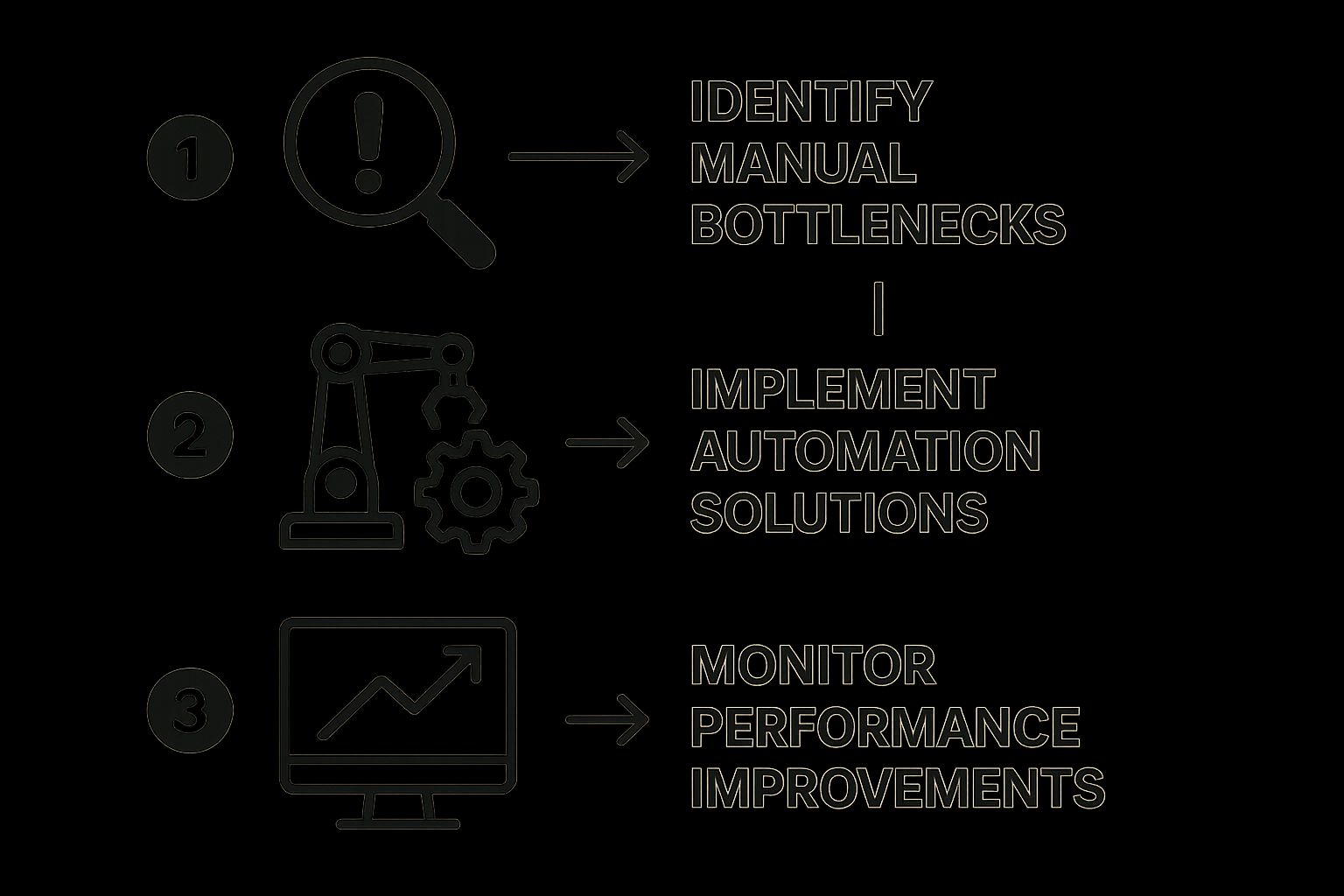
This visual really drives home that successful automation isn’t a one-and-done project. It's a continuous cycle of spotting bottlenecks, implementing solutions, and then carefully monitoring the results to drive even more improvements.
Step 4: Design and Test the Automated Workflow
Now for the fun part. It’s time to actually build your new, automated process in the software you've chosen. Using your detailed workflow map as a guide, you’ll start configuring the triggers, actions, and logic that bring the automation to life.
But hold on. There's a crucial point here that too many teams skip: testing is non-negotiable. You have to run the new workflow through its paces in a controlled environment. And be sure to involve the real end-users—the people who will interact with this process every day. Their feedback is pure gold for catching problems and polishing the workflow before it goes live. This phase ensures the automation not only works on a technical level but is also practical and user-friendly for your team.
Step 5: Deploy and Monitor Performance
Once testing is done and you’ve ironed out the wrinkles, you’re ready to go live. You can now roll out the new automated process to the relevant team or department. But your work isn’t finished just because you flipped the switch.
Great business process automation demands continuous monitoring. You need to be tracking key performance indicators (KPIs) to confirm that the automation is delivering the benefits you expected.
- Processing Time: Just how much faster is this task now?
- Error Rate: Have you seen a measurable drop in mistakes?
- Cost Savings: What's the real financial impact of the time saved and errors avoided?
Keeping an eye on these metrics allows you to prove the project's ROI and, just as importantly, spot new opportunities to fine-tune the workflow even more over time.
Elevating Automation with AI and Smart Integrations
Standard business process automation is brilliant at what it does: handling clear, rule-based tasks with perfect precision. It’s the engine that never gets tired and follows the instructions to the letter, every single time. But what happens when the task isn't so black and white? That’s where things get interesting, and where a smarter approach—often called Intelligent Process Automation (IPA)—comes into play.
Think of it like this. Your standard automation is a highly efficient assembly line, flawlessly putting together pre-defined parts. Now, imagine you place a master craftsperson on that line—someone who can spot tiny imperfections, understand nuance, and make smart judgements on the fly. That craftsperson is the AI. It doesn't get rid of the assembly line; it makes it smarter, more adaptable, and infinitely more powerful.
This becomes incredibly clear the moment a process involves a customer. A basic automated workflow can log a support ticket from a form, no problem. But it can’t pick up on the frustration in a customer’s voice or figure out what they really mean when their words are a bit vague. This is where AI, especially conversational AI, delivers a massive upgrade.
Where Intelligence Meets Automation
Let's look at a common customer service situation. Your automated workflow might be set up to handle an initial contact form, but an AI-powered assistant, like the one we've built at Voicetta, can achieve so much more. It can jump into a natural, two-way conversation, get to the heart of the customer's problem, and deliver a helpful, personalised answer in moments.
Here’s a glimpse of how this powerful combination works in the real world:
- Handling Service Calls: An AI voice assistant can answer your phones 24/7, tackle common questions instantly, and walk customers through basic troubleshooting. If an issue gets too tricky, it gathers all the important details before seamlessly handing off the call—along with the full context—to a human agent. No more repeating information.
- Qualifying Sales Leads: Instead of just sending an automated "we'll be in touch" email, an intelligent system can actually talk to potential leads. It can ask smart qualifying questions to figure out their needs, budget, and urgency. It then routes only the hottest, pre-vetted leads to your sales team, along with a complete transcript of the conversation.
- Conducting Customer Surveys: After a customer interaction, an AI can place a natural-sounding call or start a chat to collect feedback. Because it can ask open-ended questions and understand the feeling behind the answers, you get rich, detailed insights that a simple multiple-choice form could never provide.
This isn't about replacing rule-based automation with AI. The real magic happens when they work together. You let structured workflows handle the predictable parts and bring in intelligent systems to manage the messy, unpredictable, human-centric moments.
What you get is a system that truly offers the best of both worlds. You have the iron-clad reliability and efficiency of business process automation fused with the perceptive, flexible skills of AI. This blend is how you build a genuinely better customer experience, transforming routine touchpoints into valuable conversations that create loyalty and fuel your growth.
Common Questions About Business Process Automation
Dipping your toes into business process automation always stirs up a few crucial, very real-world questions. It's completely normal to feel a bit of excitement mixed with a healthy dose of caution. Let's walk through three of the biggest questions we hear from leaders, so you can feel clear and confident about what's next.
Is Business Process Automation Too Expensive for Us?
This is usually the first question on everyone's mind, and for good reason. The price tag on automation software can vary wildly, from simple cloud-based tools to massive enterprise-level systems. But just looking at the upfront cost is only seeing half the story.
The real conversation should be about return on investment (ROI). Think about it this way: how many hours does your team pour into repetitive, manual tasks every single week? What about the cost of fixing the inevitable human errors that come with that kind of work? Automation directly tackles those costs, and you’ll often find it pays for itself much quicker than you’d think.
The best way to look at automation isn't as a cost, but as an investment. It’s a tool that actively stops money from leaking out of your business through wasted time and avoidable mistakes.
Will Automation Replace Our Valued Team Members?
The fear of robots taking jobs is a popular narrative, but in the world of BPA, it’s mostly a myth. The goal here is augmentation, not replacement. Automation is brilliant at handling the boring, repetitive, rule-based work that, let’s be honest, most people don’t enjoy anyway.
When you hand those tasks over to software, you free up your team to do what they do best: solve complex problems, think creatively, and connect with customers on a human level. These are skills no machine can touch. We often see new, more interesting roles emerge—people who analyse the data, refine the automated workflows, and find new ways to innovate. Your team stops being cogs in the machine and starts becoming the strategists who manage the system.
Where Is the Best Place for Our Company to Start?
Faced with a world of possibilities, it’s easy to get analysis paralysis. The best advice I can give is to start small and go for a quick win. Please don't try to overhaul a massive, mission-critical process on day one.
Instead, find a single, straightforward process that's causing a headache in one department, like finance or HR. Automating something like invoice processing or the first few steps of new employee onboarding is a perfect testing ground. A small success there builds incredible momentum and creates a powerful case study you can use to get buy-in from the rest of the company. It also gives you a chance to measure the impact, which is vital for tracking all your key customer service performance indicators.
Are you ready to stop letting opportunities slip through the cracks and truly empower your team? Voicetta’s intelligent AI platform works 24/7 as a tireless assistant, making sure every customer interaction is handled with precision. See how you can automate routine communications and free your people for the work that matters most by visiting https://voicetta.com.