
A chatbot on Facebook isn't just a clever bit of tech; it’s your frontline digital assistant, offering 24/7 automated customer support and truly personal conversations right inside Messenger. Think of it as a dedicated team member for your business page who can answer questions, qualify leads, and nudge users along the sales journey, all on its own.
Why a Chatbot on Facebook Is a Game-Changer
Before we jump into the nuts and bolts of setting one up, let's get to the why. Why is Facebook Messenger still such a crucial place for businesses to be? It's more than just an app; it’s woven into the daily fabric of life for millions, especially in a connected market like Poland. This gives you a direct, unfiltered line to your audience right where they’re already scrolling and chatting.
The real magic of a Messenger chatbot is its ability to be there the second a customer needs you. Picture this: it's late at night, and a potential buyer is on your page, wondering about shipping times. Without a bot, they'd have to wait until morning. With one, they get an instant, correct answer, which could be the difference between a sale won and a customer lost.
Meeting Customers Where They Are
The statistics paint a very clear picture. In Poland, Facebook Messenger is a dominant force in communication. By early 2025, the platform had around 19.63 million users—that's more than half the country's population. The biggest chunk of those users, people aged 25 to 34, are the prime demographic for most businesses. You can get a deeper look into the digital landscape in Poland to see the full scope.
Putting a chatbot on Messenger isn't about hopping on a trend. It's a smart, strategic move to engage with your customers in a space they already know and trust. That kind of immediate, conversational help builds confidence and smooths out the path to purchase.
The real objective isn't just to automate replies. It's about crafting an experience so smooth and genuinely helpful that customers feel valued, whether they're talking to a person or a well-programmed bot.
Tangible Business Benefits
Beyond quick answers, a well-built chatbot delivers results you can actually measure. It shifts your Facebook page from being a static billboard to a dynamic, interactive space for driving sales and offering support.
Here’s a look at the key advantages you can expect when you implement a chatbot on your Facebook page.
Key Benefits of a Facebook Chatbot for Your Business
A quick overview of the strategic advantages of implementing a chatbot on Facebook Messenger.
| Benefit Area | Impact on Business |
|---|---|
| Always-On Availability | Your business never closes. A chatbot captures leads and handles queries 24/7, even on weekends and holidays. |
| Instantaneous Support | In today's fast-paced world, immediate answers boost customer satisfaction and stop them from looking elsewhere. |
| Scalable Engagement | A single chatbot can manage hundreds of conversations at once, ensuring no one is ever left waiting. |
| Efficient Lead Filtering | It asks the right questions to separate hot leads from casual browsers, saving your sales team valuable time. |
At the end of the day, a Facebook chatbot is all about creating efficient, one-on-one interactions that can be scaled up massively. It takes the routine work off your team’s plate so they can tackle more complex issues, all while ensuring every customer gets the instant attention they’ve come to expect. This is how you turn a simple question into a loyal customer.
Choosing the Right Chatbot Building Platform
Stepping into the world of chatbots can feel like being handed an endless menu. The first big decision you’ll face is whether to go with a user-friendly, no-code platform or a more powerful, custom-coded solution. This choice really sets the stage for your chatbot's capabilities, your budget, and the skills your team will need.
Honestly, there’s no single "best" answer here. The right platform is simply the one that fits your specific business goals and resources. Think of it like buying a suit: you can grab one off the rack that’s quick and effective for most occasions, or you can invest in a bespoke one that’s perfectly tailored but costs more time and money.
No-Code Platforms: The Accessible Entry Point
No-code platforms like ManyChat or Chatfuel are wildly popular, and for good reason. They give you these visual, drag-and-drop interfaces that let you build a functional chatbot on Facebook in a few hours, not weeks. You absolutely don’t need to be a developer to get one up and running.
These tools are fantastic for handling the everyday stuff with ease:
- Answering frequently asked questions (FAQs).
- Grabbing lead information like email addresses.
- Scheduling appointments or product demos.
- Sending out simple promotional messages to your followers.
The biggest win here is speed. You can get your ideas out there, see what works, and get feedback from real users almost immediately. For most small to medium-sized businesses, a no-code platform packs more than enough punch to seriously boost customer engagement. As you start looking around, it’s a good idea to compare top platforms for chatbots to see which one clicks with your needs.
Custom and AI-Powered Solutions: The Path to Deeper Integration
While no-code builders are a brilliant starting point, they do have their limits. What happens when you need a chatbot that can pull a customer’s order history from your CRM, check real-time stock levels, or handle a complex, multi-part question using natural language? That’s when you need something more robust.
This is where platforms like Voicetta shine, offering deep integration capabilities and advanced AI that turn your chatbot into a true extension of your business. It moves beyond simple, pre-scripted answers and starts to understand intent, learn from conversations, and deliver genuinely personalised experiences. This isn't just a hypothetical; it's a proven model.
My Advice: Start with your core business need. Are you trying to answer simple questions quickly, or do you need a tool that can plug directly into your business software? Your answer will point you straight to the right type of platform.
Making this decision is crucial, and it’s something we cover in more detail in our guide on how to implement a chatbot: https://www.voicetta.com/how-to-implement-a-chatbot. Ultimately, the best platform is one that solves today’s problems and has the flexibility to grow with you as your business—and your customers’ needs—become more complex.
Crafting Conversations That Actually Connect
Alright, this is where the magic happens. It’s time to give your chatbot a personality and a purpose. We're moving beyond basic commands to design conversations that feel genuinely helpful, natural, and like they're coming from your brand. A truly great chatbot doesn't just parrot back information; it guides people, anticipates what they need, and sounds like you.
Think about that very first message someone gets. It’s your digital handshake, and it sets the tone for everything that follows. It needs to be clear, friendly, and instantly show its value. Forget the robotic "Hello, how can I help you?"
Instead, try something with a bit more life that manages expectations from the get-go. For example: "Hi there! I'm the digital assistant for [Your Brand]. I can help you track an order, browse our new collection, or connect you with a human. What's on your mind today?" That small change makes a massive difference.
Mapping Out Core Customer Dialogues
Before you jump into writing scripts, take a step back. What are the top three to five reasons your customers are messaging you on Facebook right now? These are the first conversations you need to nail. Don't try to build a bot that does everything at once. Focus on mastering the essentials first.
Most businesses I've worked with start with a few key areas:
- Answering Common Questions: Things like, "What are your business hours?" or "Do you offer international shipping?"
- Checking Order Status: This one is a huge time-saver for any e-commerce support team.
- Booking Appointments: A powerhouse for service businesses looking to capture leads.
- Product Recommendations: Perfect for guiding users to the right purchase.
The secret to making these dialogues feel engaging is a well-thought-out chatbot conversation flow design. You're essentially creating a roadmap for the user, making sure they never feel lost or hit a dead end. Once you've mapped out these core needs, you can start scripting responses that are not just accurate, but conversational.
The goal here is to make the experience feel less like filling out a form and more like a helpful chat. Keep the tone friendly, break up your messages into small, digestible chunks, and don't be afraid to use an emoji or two where it feels right.
Designing an Intuitive User Experience
The best chatbot on Facebook is one that guides users without them even realising it. Instead of making them type out every single question, you should be using Messenger's built-in tools to make their life easier. Quick-reply buttons and persistent menus are your absolute best friends for this.
For example, right after your welcome message, you could present buttons like "Track My Order," "Ask a Question," and "Speak to an Agent." This simple structure instantly shows people what the bot is capable of and gets them where they need to go, faster.
This approach is especially effective in Poland, where Facebook is the dominant social media platform. A huge chunk of users—around 25%—are in the 25-34 age bracket. This is a demographic that grew up online and expects quick, intuitive digital interactions, especially on Messenger.
By using these interactive elements, you turn a passive Q&A into an active, guided experience. The user feels in control, and you get the structured information you need to help them properly. This is a crucial first step as you begin to automate customer support without losing that essential human touch. When you craft these flows with care, your chatbot transforms from a potential frustration into a truly valuable asset.
Connecting and Launching Your Chatbot
Alright, you’ve mapped out your conversations and your scripts are ready to go. Now for the exciting part: making your chatbot a living, breathing part of your Facebook Page. This is the final technical hurdle, but don't worry, I'll walk you through it step-by-step, no confusing jargon allowed.
The goal is to get your bot connected, permissions sorted, and run through a final pre-flight check to make sure the launch goes off without a hitch.
Connecting your chatbot builder is usually the easiest part, especially with the great no-code platforms out there today. It’s typically a simple case of authorising the tool to access your Facebook Page, which lets it manage and reply to messages on your behalf.
Setting the Right Permissions
When you make that connection, Facebook will pop up with a list of permission requests. It’s so easy to just click "accept all" and move on, but take a second to see what you're actually agreeing to. Your bot absolutely needs permissions like pages_messaging (to send and receive messages) and pages_manage_metadata (to handle basic page info).
Any reputable platform will only ask for the permissions it truly needs to operate. Giving it this access is what lets the tool become the "brain" for your chatbot on Facebook, driving the conversations right inside Messenger.
The Pre-Launch Testing Checklist
I can't stress this enough: before you tell a single customer about your new bot, you have to test it relentlessly. A buggy launch can sour the customer experience and do more harm than good. I've learned this the hard way.
Here’s the simple checklist I run through every single time:
- Click Everything: Seriously. Test every single button and quick reply. You’re looking for broken paths and dead ends.
- Read It Aloud: Go through every message. Does it sound like you? Is the tone right? Catching a silly typo now is much better than a customer finding it later.
- Try to Break It: What happens if someone types gibberish or asks a completely random question? You need to see how your bot handles the unexpected. A solid fallback message ("I'm not quite sure, but I can get a human to help you.") is a lifesaver.
- Check the Human Handoff: If a user needs to speak to a person, does that process actually work? Make sure the alert goes to the right place and the transition is smooth for the customer.
A great chatbot is never really "finished." The launch is just the starting line. Your best insights will come from watching how real people use it and then tweaking your flows based on what you learn.
This image really captures the full journey, from a simple idea to a fully optimised tool.
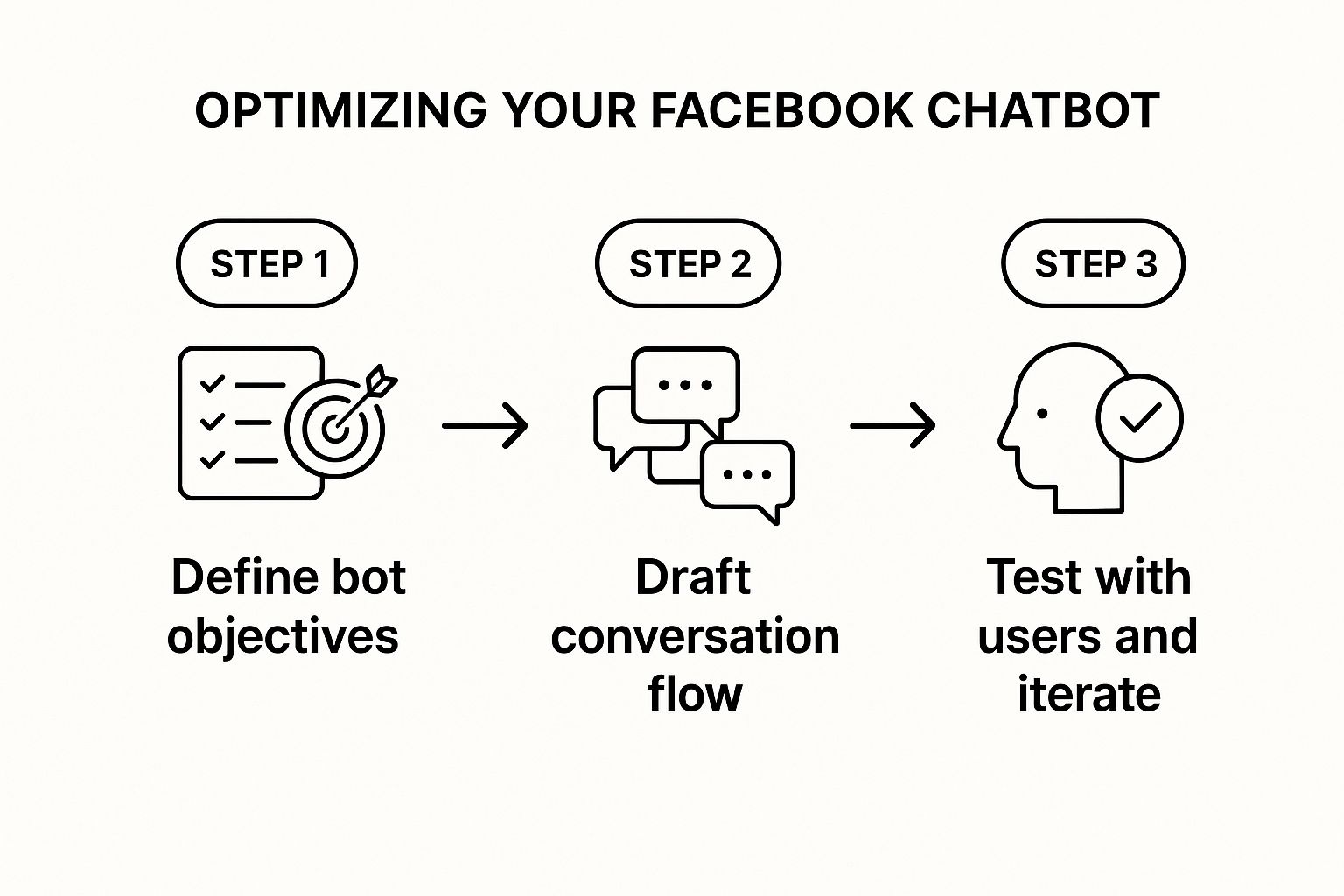
As you can see, a successful bot isn't just about the build. It’s about having a clear purpose, testing like crazy, and being ready to make changes based on what your users are actually doing.
Once you’ve worked through these checks and you feel good about how the bot performs, you’re ready for showtime. You can either quietly turn it on and let people discover it naturally, or you can make a big announcement. Whichever path you choose, you've just built a digital assistant that’s ready to help your customers around the clock.
How to Grow Your Chatbot After Launch
Getting your chatbot live on Facebook is a brilliant milestone, but honestly, it’s just the starting line. The real magic happens with what you do next. A chatbot isn't a slow cooker you can just "set and forget"—it's a living part of your team that needs guidance to get smarter and more helpful over time.
Your most powerful resource right now? Your conversation logs. This is where you get raw, unfiltered feedback on what your customers are actually thinking and asking. Diving into these logs isn't about being nosy; it's about listening at scale. You'll quickly see where chats are going well and, more importantly, where people are hitting dead ends.
Analysing User Interactions for Clues
Think of yourself as a detective for the first few weeks post-launch. Your mission is to hunt for patterns in how people are talking to your bot.
Are dozens of people asking a question your bot can't answer? That's a massive clue telling you exactly what new conversational flow to build next. Did a user type something that should have triggered a response but didn't? That's your signal to add more trigger keywords and phrases for that intent.
This cycle of review and refinement is what turns a basic, clunky bot into a genuinely effective one. I always suggest blocking out a bit of time each week just for this. Keep an eye out for:
- Common Unanswered Questions: These are goldmines. Each one is a direct request for new content or features.
- Points of Frustration: Where do users give up, type "human," or just disappear from the conversation?
- Unexpected Phrasing: Pay close attention to how real people ask for things versus how you assumed they would. The difference can be surprising.
This feedback loop is absolutely essential. It’s how your chatbot on Facebook evolves from a simple FAQ robot into a dynamic tool that truly understands and adapts to your audience.
My best advice is to treat your new chatbot like a new employee. For the first few weeks, it's going to need a lot of training and direct guidance from you. Over time, it will become more autonomous, but it will always perform better with your ongoing oversight and direction.
Scaling Your Chatbot’s Abilities
Once you've ironed out the initial wrinkles and the core functions are running smoothly, it's time to think bigger. How can this bot do more?
This is when you start looking at integrating it with your other business systems. Imagine connecting it to your CRM, allowing the bot to pull customer data for genuinely personalised interactions. A chatbot that greets a returning customer by name and references their last purchase is a world away from a generic welcome message.
This is also where more advanced platforms really show their value. For businesses ready to build these deeper, more connected experiences, exploring what a Voicetta chatbot can do opens up a whole new world of automation and customer service.
By plugging your bot into your core operations, you change it from a simple support tool into a powerful extension of your entire business—one that’s ready to build loyalty and even drive sales, 24/7.
Got Questions About Facebook Chatbots? Let's Clear a Few Things Up
So, you're thinking about adding a chatbot to your Facebook Page. It’s a smart move, but it's natural to have a few questions swirling around. I hear the same ones come up all the time, from budget worries to just how smart these bots actually are. Getting these answers straight from the start will save you a lot of headaches down the road.
Let's dive into some of the most common queries I get.
"How Much Is This Actually Going to Cost Me?"
This is always the first question, and the honest answer is: it depends. The price tag can swing wildly.
For simple, straightforward tasks, you can get started with a no-code platform for a monthly subscription, usually somewhere between €15 and €50. This is a great entry point. But if you're looking for a genuinely intelligent AI bot that can handle complex conversations and integrate with your other business systems, you're looking at a custom development project. Those costs can certainly run into the thousands, but for businesses with a high volume of customer contact, the ROI is almost always worth it.
"Can It Really Understand Polish?"
This is a big one, especially here in Poland. We all know our language has its quirks, from slang and dialects to the creative typos people make when they're in a hurry. A basic, old-school bot will get stuck fast. It only knows the exact keywords you program into it, which makes for a very clunky, frustrating experience.
This is where modern AI makes all the difference. The bots we build today use Natural Language Processing (NLP) to understand context, not just keywords. They can figure out what someone means even if they misspell a word or use a colloquialism. The trick is to make sure your chosen platform has a strong NLP model specifically for the Polish language. That’s the secret sauce that turns a robotic script-reader into a helpful assistant.
Here’s a piece of advice I can't stress enough: The single most important factor for a successful chatbot is managing people's expectations. Be upfront about what your bot can and can't do. And always, always have a seamless way for a user to ask for a human. It's not an optional extra; it's essential.
"Don't I Just Write a Few Answers and I'm Done?"
If only it were that simple! A chatbot’s intelligence isn't just about the answers you give it; it's about teaching it to understand the questions. You have to train it to recognise user intent, even when it's phrased in dozens of different ways.
Think of it less like a one-time setup and more like tending a garden. It’s an ongoing process. You'll need to regularly review conversations, see where the bot got confused, and use that feedback to expand its knowledge. It’s a fascinating process, and if you want a deeper dive, you can learn more about how to train a chatbot here.
At the end of the day, a great chatbot on Facebook isn't just launched; it's nurtured. With every conversation, it gets a little bit smarter, evolving from a simple FAQ machine into a genuine asset for your business.
Ready to build a chatbot that never misses a lead? Voicetta provides 24/7 AI-driven communication that integrates seamlessly with your business, turning every interaction into an opportunity. Discover more at https://voicetta.com.