
Blog
Automate Customer Support: Top Tips for Smarter Service
Customer support automation has evolved significantly. Think back to the early days of simple, rulebased chatbots. These often led to frustrating experiences for user...
The Evolution of Customer Support Automation

Customer support automation has evolved significantly. Think back to the early days of simple, rule-based chatbots. These often led to frustrating experiences for users due to their limited capabilities. These systems could only handle the simplest of inquiries, relying heavily on keyword matching and pre-written responses. Anything more complex required a human touch. Yet, this initial phase was a necessary stepping stone for the more sophisticated systems we use today. The drive towards better support comes from the need for businesses to offer efficient, round-the-clock service in the face of ever-increasing customer expectations.
From Basic Chatbots to Intelligent Assistants
The next step in this journey brought us natural language processing (NLP). NLP enabled chatbots to understand the subtleties of human language, leading to more natural and productive conversations. To truly grasp this evolution, it's worthwhile to look at current best practices: How to Automate Customer Service: Proven Strategies. Further advancements came with the integration of machine learning. Machine learning allowed these systems to learn from past interactions, constantly improving their performance. This marked a turning point, greatly expanding the range of customer inquiries automated systems could manage. These advancements paved the way for intelligent assistants, now capable of solving complex problems and offering truly personalized support, a crucial development for businesses seeking efficient automation.
The Rise of AI-Powered Ecosystems
Now, we're entering a new era: the rise of AI-powered ecosystems. These integrate various technologies to create seamless, personalized support experiences. These go far beyond basic chatbots. They include elements like robotic process automation (RPA) to handle repetitive tasks and predictive analytics to anticipate customer needs. RPA can automate tasks such as updating customer information or processing refunds, allowing human agents to address more challenging inquiries. Predictive analytics, meanwhile, can identify potential issues before they even arise, enabling proactive customer service and boosting satisfaction. The increasing adoption of AI is having a huge impact on business efficiency and customer satisfaction alike. AI-powered chatbots are projected to handle up to 95% of customer interactions by 2025, and 67% of consumers have already used them. This automation is bringing significant cost savings, with some companies, like NIB, reporting savings of $22 million. For a deeper dive into these statistics, see: https://www.desk365.io/blog/ai-customer-service-statistics/. This points to a future where AI plays a pivotal role in customer support.
Game-Changing Technologies That Transform Support
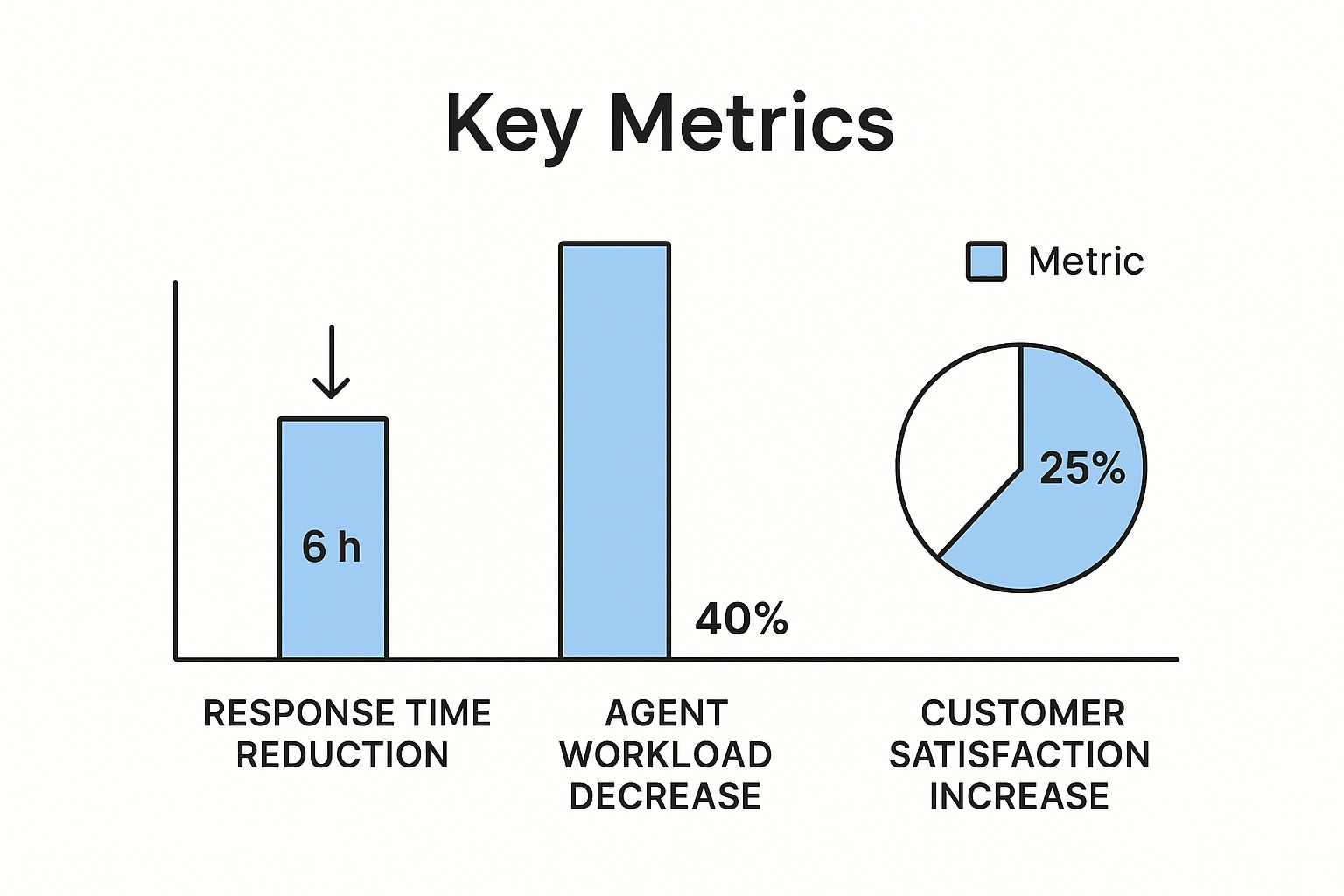
The infographic above illustrates the positive impact of automated customer support. It highlights improvements in key metrics such as response time, agent workload, and customer satisfaction. Implementing these technologies can bring significant benefits.
Imagine reducing response times from 24 hours to a mere 6 hours. That’s a massive improvement! Automated support also leads to a 40% decrease in agent workload and a 25% increase in customer satisfaction. These impressive results showcase the potential of automation to streamline operations and enhance the customer experience. For more insights, check out this helpful resource: How to master customer support automation.
AI-Powered Chatbots and NLP
One of the most prominent advancements in customer support is the emergence of AI-powered chatbots. These aren't the basic, rule-based bots of yesterday. Modern chatbots utilize Natural Language Processing (NLP) to comprehend and respond to complex customer inquiries with remarkable accuracy.
This capability allows chatbots to handle a broader spectrum of questions. Consequently, human agents are freed up to focus on more complex issues or those requiring a personal touch. For example, a chatbot can efficiently handle password resets, track orders, or provide basic product information.
Robotic Process Automation (RPA)
Robotic Process Automation (RPA) is another crucial technology reshaping customer support. RPA excels at automating repetitive, rule-based tasks that previously demanded manual effort from human agents. This can include tasks such as data entry, updating customer records, or processing refunds.
By delegating these routine tasks to RPA, support teams become significantly more efficient. This allows agents to dedicate their time to providing personalized, high-touch service where it's most valuable. This shift enables agents to focus on building stronger customer relationships and addressing complex issues requiring human intervention. The increasing adoption of AI, machine learning, and RPA to enhance customer support is a key trend in the industry. Contact Center Automation Trends explores these trends in more detail. AI-driven predictive analytics enable managers to better anticipate call volumes, while RPA automates repetitive tasks. Advanced customer service bots further refine support workflows by offering more human-like interactions.
Machine Learning and Predictive Analytics
Machine Learning elevates support automation by enabling predictive analytics. Through analyzing large amounts of data, machine learning algorithms can identify trends and anticipate future customer behavior.
This empowers support teams to proactively address potential issues before they escalate. For instance, if a customer recently purchased a complex product, the system could automatically send a follow-up email with helpful tips or resources. customer support automation offers a more in-depth look into the history of automation in customer service. This proactive approach not only increases customer satisfaction but also reduces support costs by mitigating potential problems.
To provide a clearer understanding of the various automation technologies available, we've compiled the following comparison table:
Customer Support Automation Technologies Comparison
This table compares key automation technologies based on implementation complexity, cost factors, and business impact.
| Technology | Implementation Complexity | Initial Investment | Maintenance Cost | ROI Timeframe | Best For |
|---|---|---|---|---|---|
| AI-Powered Chatbots | Moderate | Moderate | Low | Short-term | Handling frequent, simple queries |
| Robotic Process Automation (RPA) | Moderate to High | High | Moderate | Mid-term | Automating repetitive tasks |
| Machine Learning & Predictive Analytics | High | High | High | Long-term | Proactive support and personalized experiences |
This table highlights the varying levels of investment and complexity associated with each technology. While chatbots offer a quicker ROI for handling basic inquiries, RPA and machine learning require a greater investment but provide long-term benefits for automating more complex processes and personalizing the customer journey. Choosing the right technology depends on specific business needs and resources.
The Real ROI: Making the Business Case for Automation

Beyond the hype, how do you justify the expense of automating customer support? The key lies in understanding and presenting a clear return on investment (ROI). This section explores the tangible financial benefits companies have seen after successfully implementing automated customer support solutions.
Quantifying the Benefits of Automation
Automating customer support offers several financial advantages. One significant benefit is a reduction in labor costs. Automated systems handle routine questions, freeing up human agents to tackle more complex issues.
This boosts agent productivity, potentially allowing you to manage a higher support volume with a smaller team. Automation also often results in faster resolution times.
Quicker resolutions lead to happier customers and improved customer satisfaction scores. For exploring automation options within your budget, you might consider checking out Voicetta's pricing plans.
However, measuring ROI goes beyond simply calculating cost savings. It involves considering the long-term impact on customer lifetime value. Satisfied customers are more likely to return, leading to increased revenue over time. This is where the real power of automation shines.
Case Studies and Real-World Examples
Real-world examples highlight the financial impact of automation. Many companies report significant cost reductions after implementing automated support systems. These savings often translate into a substantial ROI, sometimes within the first year.
Some businesses have seen a 20% reduction in support costs after automating routine tasks like password resets and order tracking. This allows agents to dedicate their time to tasks requiring human interaction, like complex technical troubleshooting or handling customer complaints.
Addressing Misconceptions About Implementation Costs
One common misconception is that automation is prohibitively expensive. While there are upfront costs for software and integration, the long-term benefits often outweigh these initial investments. A range of automation solutions exists to suit different budgets and business needs.
Choosing the right solution is critical for maximizing ROI. This might involve a smaller-scale implementation initially, gradually expanding as your business grows. Calculating your potential ROI requires considering your specific business model and support volume.
Factors influencing your potential return include the number of daily customer interactions, the complexity of your product or service, and your current support operating costs. Despite investments in AI and automation, many companies still face high costs due to poor customer service. U.S. companies lose approximately $75 billion annually due to unsatisfactory service.
Interestingly, only about 25% of call centers have fully integrated AI automation. More detailed statistics can be found here: https://www.amplifai.com/blog/customer-service-statistics. This emphasizes the need for strategic implementation and human-centered leadership to realize automation’s full potential.
Let's take a closer look at the potential cost savings. The table below presents some illustrative examples of how different automation types can impact your bottom line.
Cost Savings from Customer Support Automation
This table presents statistical data on cost reductions achieved through different automation implementations
| Automation Type | Average Cost Reduction | Implementation Timeline | Company Size | Industry | Success Metrics |
|---|---|---|---|---|---|
| Chatbots for Tier 1 Support | 15% - 25% | 3-6 months | Small to Medium | E-commerce | Reduced wait times, increased customer satisfaction |
| Automated Email Responses | 10% - 18% | 1-3 months | Small to Large | SaaS | Improved response time, reduced agent workload |
| Self-Service Knowledge Base | 8% - 15% | 6-12 months | Medium to Large | Technology | Decreased support tickets, increased customer self-sufficiency |
| AI-Powered Ticket Routing | 12% - 20% | 6-9 months | Large | Finance | Improved agent efficiency, faster resolution times |
As you can see, the potential for cost savings through automation is significant. While the specific numbers will vary based on individual circumstances, the overall trend is clear: automation can lead to a healthier bottom line. Choosing the right automation strategy for your business requires careful consideration of your needs and resources.
Blueprint for Successful Automation Implementation
Successfully automating customer support involves a well-defined strategy. It's not simply about adopting the newest tools. It's about designing a system that elevates both efficiency and the customer experience. This blueprint provides a roadmap for effective implementation.
Assessing Your Needs and Identifying Opportunities
The first step involves analyzing your current support operations. Pinpoint your biggest pain points. Consider where your agents dedicate the most time and what the most common customer issues are. These areas present prime automation opportunities.
For instance, if password resets comprise a significant portion of your support tickets, automating this process can free up considerable agent time. Similarly, identifying frequently asked questions (FAQs) can inform the creation of a robust self-service knowledge base. This initial evaluation forms the cornerstone of your automation strategy.
Setting Meaningful KPIs and Objectives
Next, establish clear, measurable key performance indicators (KPIs). These should correspond with your broader business goals. Concentrate on metrics such as average handling time, first contact resolution rate, and customer satisfaction.
Steer clear of vanity metrics lacking real impact, such as the sheer volume of chatbot interactions. Instead, prioritize how automation improves efficiency and the customer experience. This ensures you're evaluating the important aspects. You might be interested in: How to master exceptional customer support with Voicetta.
Selecting and Integrating the Right Tools
Selecting the right automation tools is crucial. Assess various solutions based on factors like integration capabilities, scalability, and cost-effectiveness. The selected tools should seamlessly integrate with your existing systems, such as your CRM.
Consider whether the tools can manage your projected support volume and scale as your business expands. This ensures long-term value and avoids expensive replacements later. Proper technology implementation is fundamental for success.
Phased Implementation and Prioritizing Quick Wins
Implement automation gradually. Begin with a pilot program focused on a specific area, such as automating email responses to FAQs. This method allows you to test and refine your strategy before a full-scale launch.
Focusing on quick wins creates early momentum and highlights the value of automation. This initial success can secure stakeholder support and pave the way for broader automation projects.
Change Management and Team Preparation
Automation affects your team. Address any agent concerns regarding job security. Emphasize that automation empowers them to manage more complex and rewarding responsibilities.
Provide training on new tools and procedures. Cultivate a culture of continuous improvement. This approach facilitates a smooth transition and maximizes the advantages of automation.
Monitoring, Evaluation, and Continuous Improvement
Post-implementation, consistently monitor your automation performance. Track your chosen KPIs and adjust as required. The customer support environment is constantly evolving.
Regularly review your processes and tools. Stay abreast of emerging technologies and adapt your strategy accordingly. This dedication to continuous improvement is essential for lasting success.
The Human-Technology Harmony in Customer Support

The image above depicts the collaborative nature of humans and technology working together in customer support. It illustrates how this partnership enhances the overall customer experience, which is key to successful support automation. This approach strategically blends the unique strengths of both human interaction and technological efficiency to deliver outstanding customer service.
Balancing Automation and the Human Touch
Truly effective customer support automation isn't about replacing human agents. It's about giving them the technological tools they need to provide even better service. This means carefully analyzing where automation shines and where a human touch makes all the difference.
Think of it as a beautifully choreographed dance. Automation handles the repetitive steps, the predictable patterns. This then allows the human agents to step in with their artistry, providing the nuance and emotional connection that transforms a transaction into a truly positive experience. The result is a smoother, more personalized customer journey.
Identifying Automation Opportunities and Human Touch Points
Certain customer interactions lend themselves perfectly to automation. High-volume, repetitive tasks, such as answering FAQs, resetting passwords, or providing order tracking information, are prime examples. Automating these tasks frees up human agents to focus on more complex issues.
However, there are times when empathy and a deeper understanding are essential. A frustrated customer wrestling with a technical problem, for instance, greatly benefits from interacting with a human agent. Recognizing when to seamlessly transition from automation to human interaction is critical. This hand-off requires careful planning and implementation of the right technologies.
Empowering Agents Through Automation
Automation allows support agents to transition from task-oriented workers to strategic problem-solvers and relationship builders. By offloading routine tasks, automation removes much of the tedious work.
This frees agents to concentrate their energy and skills on building rapport with customers, resolving complicated problems, and delivering truly personalized support. This not only improves the customer experience but also leads to greater job satisfaction for support staff.
Incorporating Emotional Intelligence into Automated Systems
While true human empathy remains invaluable, we can integrate aspects of emotional intelligence into automated systems. Sentiment analysis, for example, allows AI-powered chatbots like those offered by Intercom to detect customer frustration.
When these systems identify negative sentiment, they can quickly escalate the interaction to a human agent, preventing further frustration and potentially saving the customer relationship. This proactive approach minimizes negative experiences and ensures that issues requiring a human touch are handled promptly.
Human Empathy: The Differentiator
Ultimately, human empathy remains the defining factor in customer satisfaction and loyalty. Automation improves efficiency, but human agents build genuine connections, fostering strong customer relationships.
This human touch builds trust, promotes loyalty, and creates a positive perception of the brand. In our increasingly technology-driven world, the ability to connect on a human level is more important than ever. This underscores the irreplaceable value of human interaction in building meaningful customer experiences.
Next-Generation Support: Emerging Automation Trends
Automating customer support is no longer a thing of the future; it's quickly becoming the norm. But the technology itself is still advancing at a rapid pace. This section explores emerging trends ready to reshape the future of automated customer support.
The Rise of Conversational AI
Conversational AI is evolving past simple chatbot interactions. These new systems can handle increasingly complex conversations, understanding nuances in language and context. This includes supporting multiple languages, making these tools valuable for global businesses. Imagine an AI system that understands not only what a customer is asking but also why, allowing for more personalized and helpful responses. This deeper understanding creates more human-like interactions and a better overall customer experience. Check out our guide on How to master exceptional customer support with Voicetta.
Augmented Reality and Visual Troubleshooting
Leading organizations are bringing together augmented reality (AR) and automated support. AR allows customers to visually troubleshoot problems with real-time guidance. For example, a customer struggling to set up a new router could use their smartphone camera to see AR overlays, showing them exactly where to connect cables. This visual approach simplifies complex instructions and makes problem-solving more efficient, drastically reducing resolution times.
Predictive Support: Addressing Issues Before They Arise
Predictive support is changing the game by anticipating customer needs before they become problems. By analyzing customer data, predictive models can identify potential issues and proactively offer solutions. Imagine a software company identifying a user struggling with a specific feature. The system could automatically offer a helpful tutorial or connect them with a support agent specializing in that area. This proactive approach minimizes frustration and builds stronger customer relationships with a sense of personalized care.
Voice Recognition: Transforming Phone Support
Voice recognition technology is finally meeting customer expectations. Advanced systems are transforming the phone support experience from frustrating to satisfying. These systems can understand complex voice commands and even detect the caller's emotional state. This means customers can navigate phone menus with ease, quickly connecting with the right department or using self-service options. For businesses relying on phone support, this advancement is crucial for streamlining operations and enhancing the customer journey.
Planning for the Future of Automated Support
These emerging trends require a strategic approach to implementation. Businesses must carefully consider their current support setup, long-term goals, and the specific needs of their customer base. Developing a clear roadmap for integrating these advanced automation technologies ensures that companies can leverage their full potential while delivering outstanding customer experiences. This proactive planning is key to staying ahead and meeting the ever-evolving expectations of today’s customers.
Key Takeaways: Your Roadmap to Support Automation Success
Automating customer support is more of a journey than a final destination. It takes careful planning, the right tools, and a commitment to continuous improvement. This section offers some key insights and recommendations to guide you on your path to automation success.
Defining Your Automation Goals and Objectives
Before you dive headfirst into automation, it's essential to clearly define your objectives. What are you hoping to accomplish? Are you aiming to reduce support costs, boost customer satisfaction, or perhaps both? Having specific, measurable goals will shape your strategy and help you track your progress.
-
Focus on Measurable Outcomes: Don't just automate for the sake of it. Connect your automation efforts to concrete metrics, such as reduced average handling time or an improved first contact resolution rate.
-
Align with Business Objectives: Your automation strategy should support your overall business goals. If your primary focus is on customer retention, prioritize automation that enhances the customer experience.
These initial steps create a solid foundation for your automation journey. Beginning with well-defined goals and objectives sets you up for success from the outset.
Choosing the Right Automation Tools
The technology you choose is critical to the effectiveness of your automation strategy. Consider key factors like these:
-
Integration Capabilities: Select tools that integrate seamlessly with your existing CRM or helpdesk software. This creates a smooth flow of information and avoids data silos.
-
Scalability: Choose tools that can scale as your business grows. Your automation platform should be ready to handle increased support volume as demand rises.
-
Ease of Use: Your team needs to be able to learn and use the automation tools efficiently. User-friendly interfaces and intuitive workflows are key to quick adoption.
-
Cost-Effectiveness: Find a balance between the tool’s features and its price. Aim for solutions that offer the best value for your specific needs.
Carefully considering these factors will help you select the best tools for your business. The next step is to plan the implementation itself.
Implementing and Optimizing Your Automation Strategy
Implementing automation is an iterative process. Begin with a pilot program to test your chosen tools and fine-tune your strategy.
-
Prioritize Quick Wins: Start by automating simple, high-volume tasks. This quickly demonstrates the value of automation and generates momentum.
-
Change Management: Maintain open communication with your team throughout the entire process. Address any concerns about job security and highlight how automation empowers them to focus on more complex and rewarding tasks.
-
Continuous Improvement: Regularly monitor your automation performance, track your KPIs, and adjust your strategy as needed. Stay informed about new trends and technologies to further refine your support operations.
Implementing automation strategically helps you maximize its potential to improve customer support. Continuous monitoring and adjustments are essential for long-term success.
The Power of Human-Technology Collaboration
Automation complements, rather than replaces, the human touch. The most effective support strategies combine the efficiency of technology with the empathy and problem-solving abilities of human agents.
-
Empowering Agents: Free up your team from repetitive tasks using automation, allowing them to concentrate on building relationships with customers and resolving more complex issues.
-
Seamless Transitions: Design customer journeys that transition seamlessly between automated systems and human agents. Ensure your customers can easily connect with a human representative when needed.
-
Emphasize Human Connection: While automation can handle routine inquiries, maintain a personal touch in your support interactions. This builds customer loyalty and strengthens relationships.
Finding the right balance between automation and human interaction creates a positive and efficient support experience, leading to increased customer satisfaction and greater business success.
Ready to transform your customer support with AI-powered automation? Voicetta, our innovative AI communication platform, ensures you never miss a customer interaction. Learn more at https://voicetta.com.
Was this useful?
If this article helped, add Voicetta as a preferred source in Google Search. Your results can then highlight our writing.
Add as preferred source