
Questions?
- “What time is check-in?”
- “Do you have parking?”
- “Is the apartment available this weekend?”
- “What is your cancellation policy?”
Voicetta answers using your property information and Guesty data.


Official Guesty integration
The 5 Star Revenue AI Employee
Bad conversations cost money.We fix that.
Voicetta handles your Guest communication across phone, SMS and WhatsApp — 24/7.
It answers questions, checks reservations, shares property details, handles booking requests, and can confirm new reservations right from the conversation.
Connected to Guesty. Ready to work.
Guests get an immediate, professional answer — day or night, including weekends and holidays.
Voicetta uses your Guesty property and reservation data to give Guests relevant, accurate answers.
Turn Guest conversations into bookings. Voicetta can check availability, handle booking requests, and create confirmed Guesty reservations when you enable it.
Phone, SMS and WhatsApp — one communication brain, one consistent Guest experience.
Guesty partner support
Questions during setup? Reach our Guesty team.
Voicetta doesn't just answer the phone.
It handles the conversation.
Voicetta answers using your property information and Guesty data.
Voicetta can check availability and pricing, guide the Guest through the booking, and — when enabled — create the confirmed reservation directly in Guesty.
Voicetta can send Guest messages through the Guesty unified inbox, so communication stays in your existing workflow.
Your Guests should not get a different experience because your team is busy.
Voicetta gives every Guest the same professional standard:
No waiting for someone to call back.
Answers based on your actual properties and reservation data.
A consistent hospitality experience across every interaction.
24/7, without adding another shift to the team.
Today, Guest communication is scattered.
Calls in one place. SMS somewhere else. WhatsApp in another tab. Guesty in another system.
Context gets lost.
Voicetta connects the conversation across channels so your team can see what happened — and the Guest gets a consistent experience.
Phone → SMS → WhatsApp → Guesty
One Guest.
One conversation.
One brain.
Connect Guesty and give Voicetta the context it needs to handle real Guest conversations.
Voicetta can access your Guesty properties and property information to answer questions about your accommodation.
Look up confirmed reservations and use stay information to give relevant answers.
Check whether a property is available for specific dates and return pricing.
Send messages to Guests through the Guesty unified inbox when the messaging action is enabled.
Post internal notes to the Guesty inbox, including conversation summaries.
Guesty reservations and listings can stay in sync through webhooks.
No AI expertise required.
No complicated implementation.
Voicetta is done-for-you. A specialist helps configure your AI employee, communication channels, tools, and launch setup around your business.
We help you get from:
I connected Guesty.
My AI employee is ready to handle Guests.
Setup
Open Voicetta and connect your Guesty account through the Guesty integration. Once connected, Voicetta syncs your Guesty properties and reservation data.
Buy a Voicetta number that can send SMS. You forward your existing number to this agent number so your AI employee can answer. You decide when — and whether — to forward calls to your new AI employee. Most carriers give you four options:
Go to Voicetta → Assistant → Actions → Guesty Configuration. Scroll down to Voice tools. Turn on the actions you want Voicetta to take:
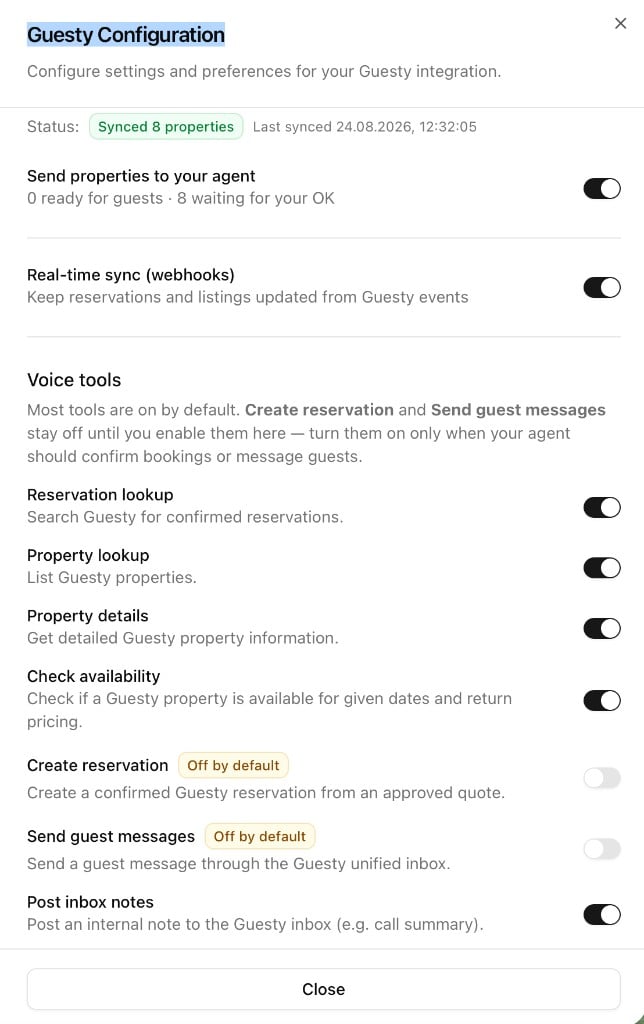
Both actions are Off by default. Enable them if you want Voicetta to confirm bookings or send messages to Guests through Guesty. The other Guesty tools — including Reservation lookup, Property lookup, Property details, Check availability, and Post inbox notes — are on by default.
Go to Guesty Configuration and send your properties to your agent. Review the properties and approve the ones you want your AI employee to use.
That's it. Your AI employee can now use your Guesty data to handle Guest conversations across phone, SMS and WhatsApp.
That's it.
Most automation focuses on doing things faster.
Voicetta focuses on doing them properly.
Every Guest interaction is a chance to:
That's why we call it a 5-Star Revenue AI Employee.
Answer questions about:
Help Guests with property information and common requests, while keeping communication professional and consistent.
Continue the conversation on the channels your Guests already use.
And because every interaction is connected, your team doesn't have to start from zero every time.
Voicetta wasn't built just to make AI sound human.
It was built around a simple idea:
Guests remember how communication made them feel.
Voicetta brings that standard to every Guest interaction — at any hour, across every channel.
You shouldn't have to choose between great Guest service and running your business.
Voicetta handles the conversations that would otherwise interrupt your team.
Your team gets more time. Your Guests get faster answers. Your business gets a communication standard you can rely on.
Guesty remains your PMS. Voicetta becomes the communication layer around it.
Your properties stay in Guesty. Your reservations stay in Guesty. Your team keeps using the tools they already know.
Voicetta handles the conversations around them.
Start free does not mean you're on your own.
A Voicetta specialist can help you configure the right setup, connect your tools, shape your agent, and get it ready for real Guest conversations.
You run the property.
We handle the communication system.
Connect Guesty and let Voicetta handle your Guest communication 24/7.
Bad conversations cost money. We fix that.